Home › Kajabi Review › Kajabi Newsletters
Kajabi Newsletters review · Updated November 2026Kajabi Newsletters Review: Write Once, Reach Every Inbox
How Kajabi Newsletters work, how they differ from email broadcasts, how to run free and paid posts, and a full example newsletter built inside Kajabi.
Start your 30-day Kajabi trial →- Kajabi user since 2012
- 3 Kajabi awards
- 30 days free, double the standard trial
 By Ant HodgesKajabi user since 2012 · Updated 8th November 2026 · 12 minute read
A newsletter is one of the simplest ways to build an audience you own. Every issue lands in the inbox of someone who asked for it, and every issue can live on your website too, where new readers find it and subscribe. Kajabi Newsletters gives you both in one place, right next to the courses, coaching and community you already sell.
My own list has lived inside Kajabi for years, and I write to it with broadcasts and sequences. Newsletters is a separate product with a different job. It's built for people who publish regular issues, free or paid, that work as web posts and as emails at the same time.
To show you exactly how it works, I built a full newsletter inside Kajabi for my example business. It belongs to Emily Chase, a patisserie chef I created for my examples, who runs The Gluten-Free Baking Community and the course Gluten-Free Baking Made Simple. Her newsletter is called The Gluten-Free Bake Sheet, and you'll see it throughout this guide.
The short answer
Kajabi Newsletters lets you write issues once and publish them to your website, your subscribers' inboxes, or both. You can keep posts free, ask readers to subscribe to see the rest, or put your best content behind a paid offer. Kajabi plans start at $179 a month, or $143 a month billed yearly, with no revenue share on what you sell. The standard Kajabi trial is 14 days, and through my partner link you get 30 days.
On this page
- What is Kajabi Newsletters?
- How is a newsletter different from Kajabi email?
- What do your readers see?
- How do you set up a Kajabi newsletter?
- How do you make some posts free and some paid?
- How do you publish and send an issue?
- Which Kajabi plan do you need for a newsletter?
- How do you write a newsletter people want to read?
- Kajabi Newsletters FAQs
What is Kajabi Newsletters?
Kajabi Newsletters is a product for publishing written content to subscribers on a schedule you choose. Kajabi describes it like a magazine. The newsletter is the brand, and each post is an issue you release weekly, monthly or whenever suits you.1
Each issue can be published on your website, sent by email, or both.10 Visitors read your posts on the web and click Subscribe to join. They confirm by email, and Kajabi then adds them to your Contacts, the same list behind everything else you sell.1
Write once
A simple editor with headings, quotes, images, buttons and embeds.3
Publish everywhere
Your issue goes to your site, to inboxes, or to both at once.10
Earn from it
Keep it free, or connect an offer for paid subscribers.1
Kajabi announced Newsletters as a full product in October 2024, after a beta that began in 2023.103 The idea behind it is simple and close to my heart. Your readers sit on a list you own, so you reach them directly instead of hoping a social platform shows them your post.2
How is a newsletter different from Kajabi email?
Kajabi has two ways to write to people, and each one has a clear job. Email campaigns, like broadcasts and sequences, are for marketing and nurturing, and I cover them in my Kajabi Email Marketing guide. Newsletters are for publishing, where each issue is a piece of content in its own right.
| What you need | Kajabi Newsletters | Email broadcasts |
|---|---|---|
| Main job | Publishing regular issues | Campaigns and announcements |
| Where it lives | Your website and inboxes | Inboxes only |
| Free and paid content | Subscriber and paywall breaks | Not built in |
| Reader comments | Optional on each post | Not built in |
| Who receives it | Newsletter subscribers | Your marketing list or a segment |
From Kajabi's Help Center, checked on 8th November 2026.156
That last row matters more than most people expect. A newsletter subscription and your marketing emails are separate lists in Kajabi. Someone who unsubscribes from your marketing emails still gets your newsletter, and the reverse is true as well.1 You can filter your Contacts to see exactly who subscribes to each newsletter.
My tip: tell new subscribers what they'll get and how often, right in your welcome. A reader who knows Sunday morning means one bake and one fix is a reader who looks out for you.
What do your readers see?
Your newsletter takes its colours and fonts from your website theme, so it looks like the rest of your brand from day one.4 You can also make it your homepage, so visitors land straight on your latest issues.1
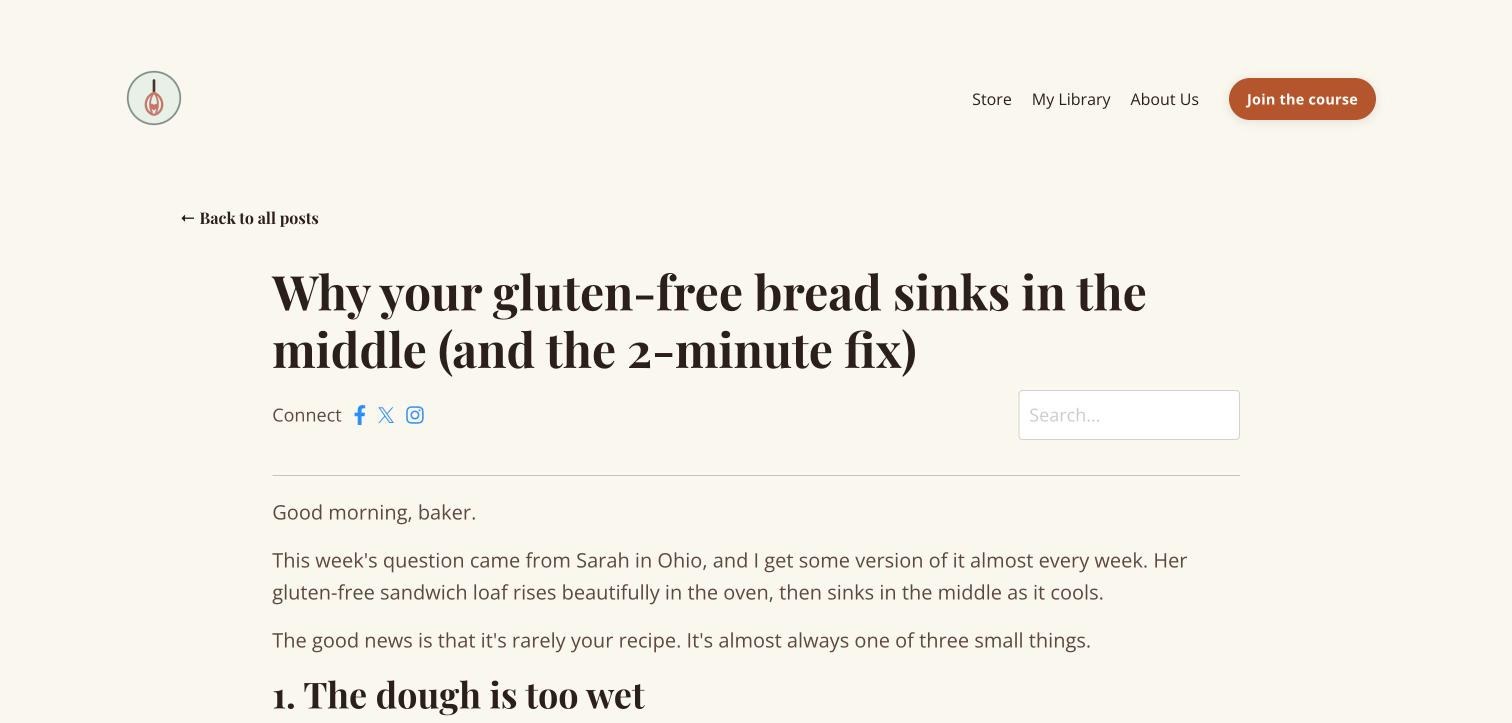
Each post has its own address, so you can share it anywhere. You can add a thumbnail, tags to help readers browse by topic, an author name, and a page title for search engines.4 Emily's issues sit under one newsletter, and readers can search past posts from the page.
Reader comments are optional for your newsletter. When you turn them on, you can make each post's comments visible, hidden or locked, and readers join your newsletter in order to reply.6 That's a lovely touch, because every conversation also grows your list.
How do you set up a Kajabi newsletter?
Setting up a newsletter takes a few minutes, and Kajabi creates the subscribe form for you. Kajabi's newsletters overview covers the details, and here are the steps in short.1
- Create the newsletterGo to Products, then Newsletters, and click New newsletter. Give it a name and a short description.1
- Check your subscribe formKajabi makes a form with the same name as your newsletter. You'll find it in your Forms, and double opt-in is on by default.1
- Style your pagesOpen your website theme and use the page selector to style your newsletter, post and subscribe pages.4
- Write your first postClick New post to start writing. Kajabi's Help Center says it gives you 3 starter posts to edit, or you can begin from scratch.3
- Test it yourselfSubscribe with your own email address before you invite anyone, so you see exactly what your readers see.1
For Emily, I created The Gluten-Free Bake Sheet with the promise "one gluten-free bake, one fix and one tip, every Sunday morning." Then I wrote 3 issues: a fix for sinking bread, her everyday flour blend, and 3 bakes for the holiday table.
How do you make some posts free and some paid?
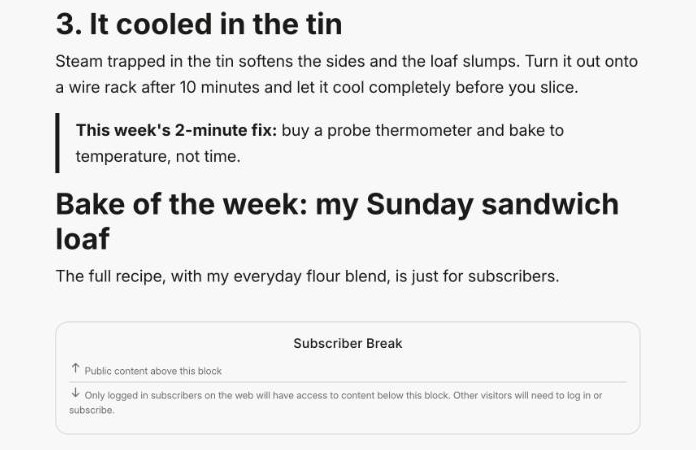
This is where Kajabi Newsletters really earns its place. Inside any post you can add a break, and everything above it stays public while everything below it is protected.5 Kajabi's guide to exclusive newsletter access explains both kinds.
Subscriber break
Content below the break is for logged-in subscribers. Everyone else sees a prompt to subscribe or log in, so it's a gentle way to grow your list.5
Paywall break
Content below the break is for paid subscribers. You connect an offer to the break, and buying that offer unlocks the rest of the post.5
In Emily's first issue, the 3 fixes for sinking bread are free for everyone. Her full sandwich loaf recipe sits below a subscriber break, so readers who want it simply join her newsletter.
You can also hide a post from your public feed, so it only goes to the subscribers you choose by email.4
How do you publish and send an issue?
When your post is ready, you click Publish and Kajabi shows you exactly where it's going. You confirm who can read it on the web, the email subject, preview text and audience, and when to send.1
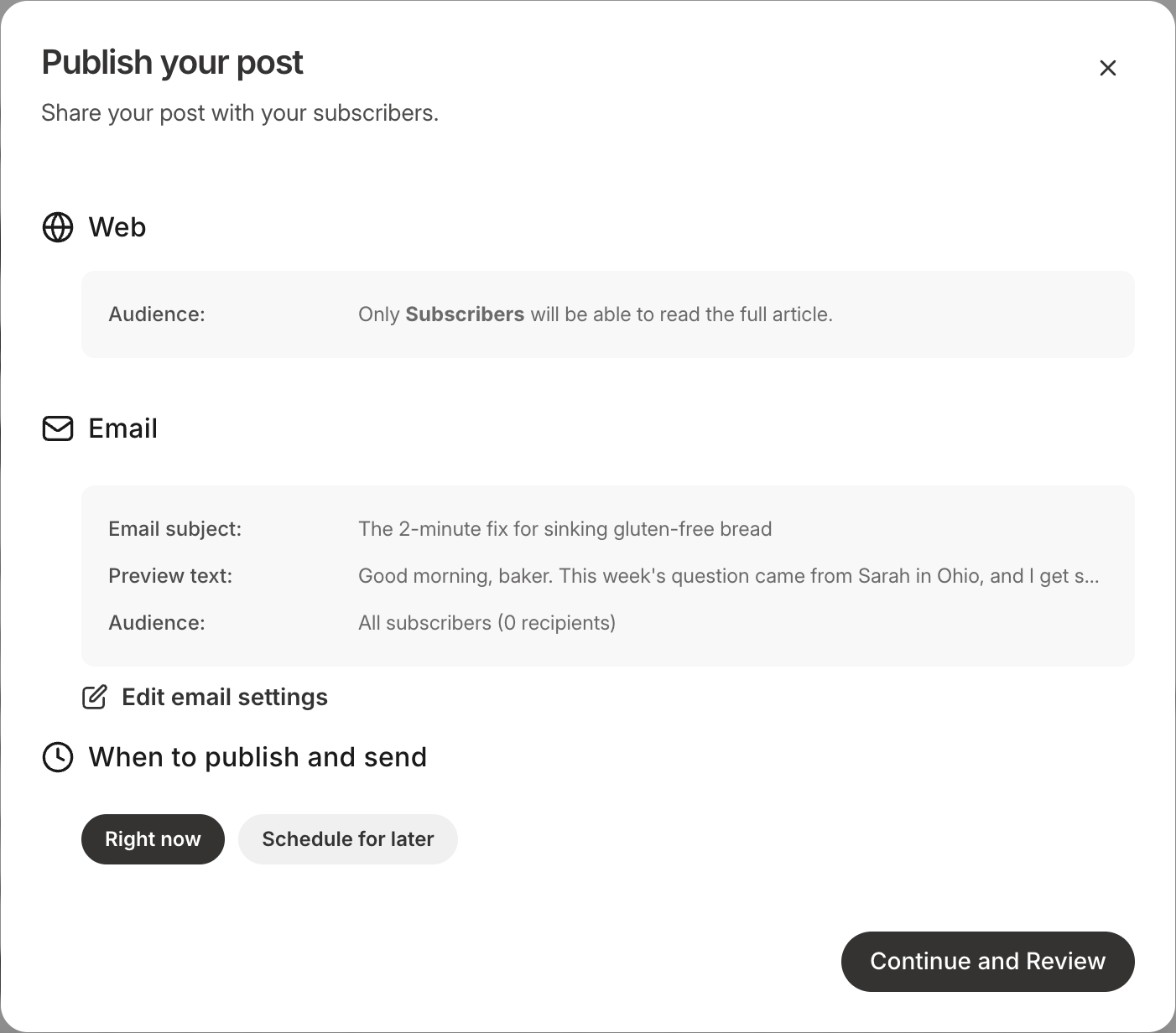
You can publish straight away or schedule an issue for later, which makes it easy to write a few issues in one sitting.1 Once it goes out, your newsletter dashboard tracks subscribers, open rate, click rate, unsubscribes, bounces and complaints.3
Kajabi's deliverability advice is worth reading before your first send. It suggests keeping subject lines under 50 characters, connecting your own email domain, and treating clicks as a better measure than opens.9
Which Kajabi plan do you need for a newsletter?
Newsletters don't appear as a separate cost on the Kajabi pricing page. What changes between plans is how many contacts you can have, how many products you can sell and your card fees, and your newsletter subscribers are contacts too.7
Basic
$179/mo
or $143/mo billed yearly
- 2,500 contacts
- 5 products
- Cards from 2.9% + 30¢
Growth
$249/mo
or $199/mo billed yearly
- 25,000 contacts
- 50 products
- Cards from 2.8% + 30¢
Pro
$499/mo
or $399/mo billed yearly
- 100,000 contacts
- Unlimited products
- Cards from 2.7% + 30¢
Prices in US$, checked on 8th November 2026. Card rates are for US businesses using Kajabi Payments.7
Kajabi takes no share of your sales on any plan, so the only cost on a paid newsletter is the normal card fee.7 If your list grows past your plan, extra contacts come in blocks of 25,000 for $125 a month.7
The standard free trial lasts 14 days, as Kajabi's trial information page explains.8 Through my partner link you get 30 days, which is enough time to set up your newsletter, write 3 issues and send the first one.
Try Kajabi free for 30 days.That's double the standard trial, through my partner link.
Start your 30-day trial →How do you write a newsletter people want to read?
The tool is the easy part. What keeps people opening issue after issue is content that feels like it was written just for them. The framework I teach for that is SEED Marketing.
Definition
SEED Marketing
SEED Marketing is a framework created by Ant Hodges, author of Simplify the Funnel®. It stands for Shape expert content, Engage your audience, Echo your values and Deliver actionable content, four habits that turn helpful content into trust.
A good newsletter issue follows those four steps naturally. Here's how Emily's first issue uses them:
Keep each issue to one idea, one story and one next step. That's the same thinking behind the Minimum Viable Funnel in my book, and it works beautifully for a newsletter.
“It’s time to reject complexity as strategy. Embrace the power of doing less, but better.”
From Simplify the Funnel® by Ant Hodges
Where does AI help with a newsletter, and where should you stay human?
My belief is that AI creates movement, and humans create momentum. Kajabi includes AI tools to help you brainstorm, draft and refine your newsletter.2 Use them for the admin around your writing, and keep the writing itself in your own voice.
Back office: let AI help
- Brainstorming topics from reader questions
- Tightening subject lines and preview text
- Turning an issue into social posts
Front office: stay human
- Your stories and your opinions
- Replies to readers' comments and emails
- Deciding what each issue is really about
Who is Kajabi Newsletters best for?
Newsletters fit experts who love to write and want that writing to grow their business. They work especially well when you already sell a course, community or coaching program that your readers can step into next.
A great fit if you
- Want to publish regular issues on your site and by email
- Plan to offer free and paid content side by side
- Already sell products on Kajabi to the same audience
Another route may suit you if you
- Only send launch and promotional emails, where broadcasts fit better
- Want a newsletter with no other products at all
Try this
Your first 30 days with Kajabi Newsletters
- Start your trial and write a one-line promise for your newsletter.
- Create the newsletter and style its pages to match your website.
- Write 3 issues before you announce it, using the SEED steps.
- Add a subscriber break to your best issue to grow your list.
- Subscribe with your own email, then publish your first issue.
Kajabi Newsletters FAQs
Can I charge for my newsletter on Kajabi?
Yes, you connect your newsletter to an offer and add a paywall break to the posts you want to protect. Readers who buy the offer can read everything below the break.51
Is a Kajabi newsletter the same as an email broadcast?
No, they're separate tools with separate subscriber lists. A newsletter publishes issues to your website and to subscribers, while a broadcast is a one-off email to your marketing list.1
Can readers comment on my newsletter posts?
Yes, you can turn on comments for your newsletter and set each post to visible, hidden or locked. Readers join your newsletter in order to comment.6
Can I schedule newsletter issues in advance?
Yes, you can publish right away or choose a future date and time. Kajabi then publishes the post and sends the email for you.1
Do newsletter subscribers count towards my contact limit?
Yes, subscribers are added to your Contacts once they confirm their email address. Basic includes 2,500 contacts, Growth 25,000 and Pro 100,000.17
More Kajabi guides
See the full Kajabi review for every feature, plan and price in one place, or read the Kajabi Email Marketing guide for broadcasts and sequences. The Kajabi Payments guide covers taking payment for a paid newsletter.

About Ant Hodges
Ant Hodges is the author of Simplify the Funnel®, a Kajabi Founder and Partner since 2012, and a winner of the Kajabi Millionaire Hero Award. He writes to a list of thousands from Kajabi and helps online business owners, coaches, creators and experts simplify their businesses.
Sources
- Kajabi Help Center (2026) "Newsletters overview." help.kajabi.com ↩
- Kajabi (2026) "Newsletters." kajabi.com/product/newsletters ↩
- Kajabi Help Center (2026) "Get started with Newsletters." help.kajabi.com ↩
- Kajabi Help Center (2026) "Customize a Newsletter." help.kajabi.com ↩
- Kajabi Help Center (2026) "Create exclusive Newsletter access." help.kajabi.com ↩
- Kajabi Help Center (2026) "Manage Newsletter comments." help.kajabi.com ↩
- Kajabi (2026) "Pricing." kajabi.com/pricing ↩
- Kajabi Help Center (2026) "Kajabi trial information." help.kajabi.com ↩
- Kajabi Help Center (2026) "Improve email Newsletter deliverability." help.kajabi.com ↩
- Kajabi (2024) "Introducing New Products: Newsletters, Downloads, & Invoicing." kajabi.com/blog ↩
All sources checked and live on 8th November 2026.

Watch me work in Kajabi
Short walkthroughs from my YouTube channel. Press play to watch here, or open any video on YouTube.

How to Build an Email List From Scratch FAST - With KAJABI
Watch on YouTube
Why Your Facebook Posts Are Invisible in 2026 | Manus AI Report
Watch on YouTube
Kajabi MCP + Claude - Building a Landing Page in Kajabi Using AI
Watch on YouTube
7 Essential Tips for Maximizing Your Kajabi Account
Watch on YouTubeFree email updates
Simplify your business, one email at a time.
Join my email list for simple, practical ideas on Kajabi, marketing and running a business that fits your life.
- New Kajabi guides and tips as soon as they go live
- Fresh blog posts and Less Is The Strategy podcast episodes
- First news of my community, training and events