Home › Kajabi Review › Kajabi Courses
Kajabi Courses review · Updated November 2026Kajabi Courses Review: How to Build a Course People Finish
What Kajabi Courses can do, what it costs in 2026, and how to keep your first course simple, from a Kajabi user since 2012.
Start your 30-day Kajabi trial →- Kajabi user since 2012
- 3 Kajabi awards
- 30 days free, double the standard trial
 By Ant HodgesKajabi user since 2012 · Updated 7th November 2026 · 10 minute read
My first Kajabi account dates back to 2012, on the original Founders plan. Today my courses, my community and my sales pages all run on it. That includes the High Converting Sales Page course, the Mastermind Retreat Playbook and the AI Coach Playbook.
So when someone asks me whether Kajabi is a good place to build a course, my answer comes from years of building real ones. This guide walks through what Kajabi Courses can do, how to set one up, what it costs in 2026, and how to keep your first course simple enough to finish.
My first course on Kajabi was Content Alchemy, back in 2012. It drew on Howard Gardner's ideas about the different ways people learn. Readers usually find writing easiest, listeners often speak well, and people who love to watch tend to feel more at home on camera, though not always. The course showed you how to create in the style that suits you, then repurpose it so your readers, listeners and watchers all get served. People bought it through the online checkout, then watched the videos, asked their questions and grabbed the downloads, all in one place. For my business back then, that simple setup made a huge difference, and Kajabi made every part of it easy.
The short answer
Kajabi Courses lets you build, sell and deliver an online course in the same place you run your website, emails and payments. You can create self-paced evergreen courses on every plan, and live cohort courses on the Growth and Pro plans. Plans start at $179 a month, or $143 a month billed yearly, and Kajabi takes no share of your sales. For coaches, experts and authors who want one simple system, it's where I'd build a course today.
On this page
- What are Kajabi Courses?
- What can you build with Kajabi Courses?
- How do you create a course in Kajabi?
- Which Kajabi plan do you need for courses?
- How do you keep a Kajabi course simple?
- Where does AI help with Kajabi Courses?
- Who are Kajabi Courses best for?
- Your first 30 days with Kajabi Courses
- Kajabi Courses FAQs
What are Kajabi Courses?
Kajabi Courses is the course builder inside Kajabi. You organise your lessons into modules and submodules, and each lesson can hold video, audio, written content and downloadable files.1 Your students log in and learn on your website, in the Kajabi mobile app, or in your own branded app.1
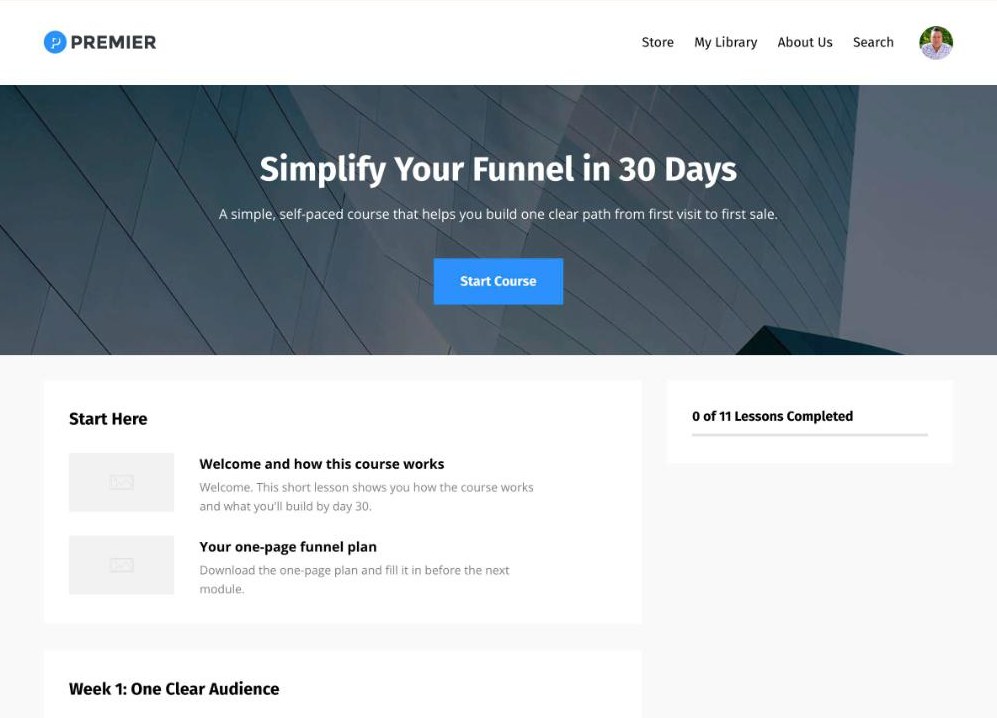
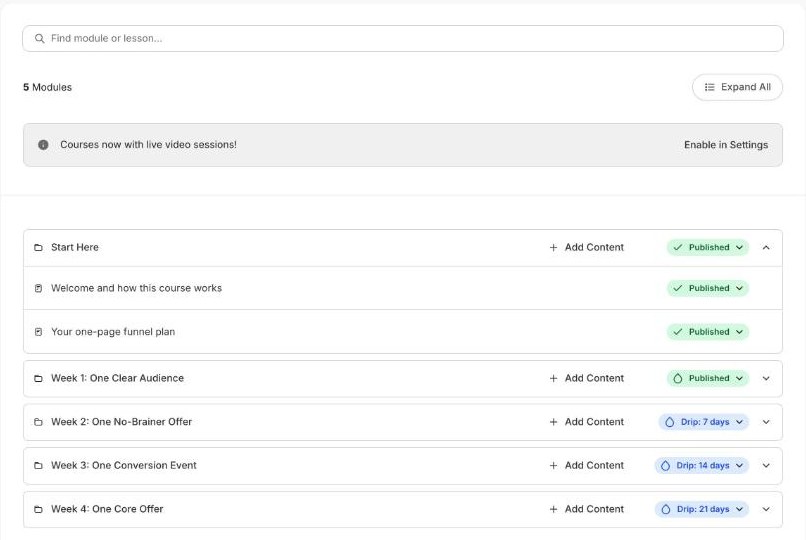
To show you how it looks, I built an example course in my Kajabi partner account. It's called Simplify Your Funnel in 30 Days, and it has five modules and eleven lessons.
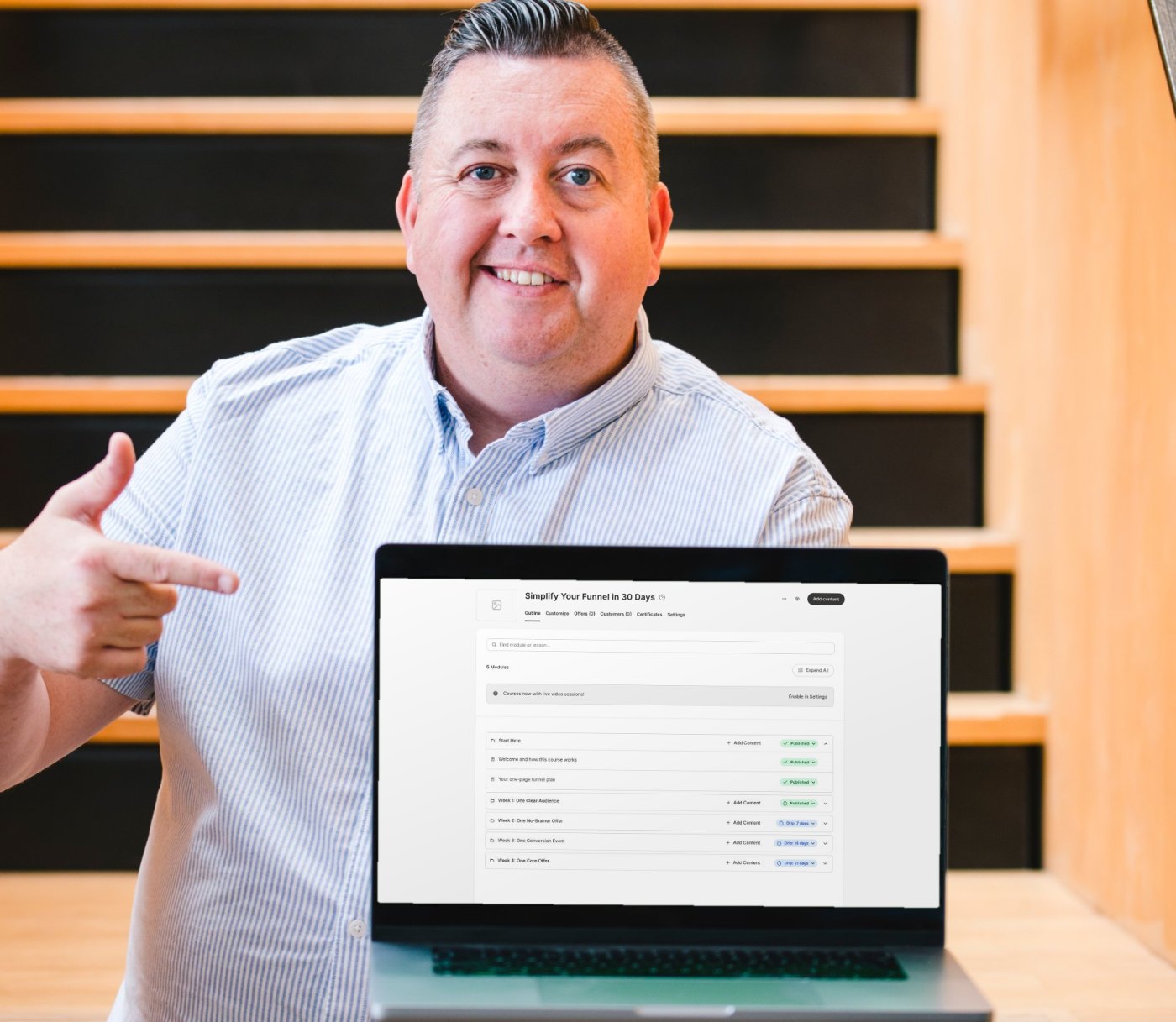
The part that matters most to me sits around the course itself. The same account runs your sales page, your checkout, your emails and your community, so nothing needs stitching together. Kajabi reports that courses on its platform have earned creators more than $8 billion, across more than 900,000 courses and 25 million students.3
What can you build with Kajabi Courses?
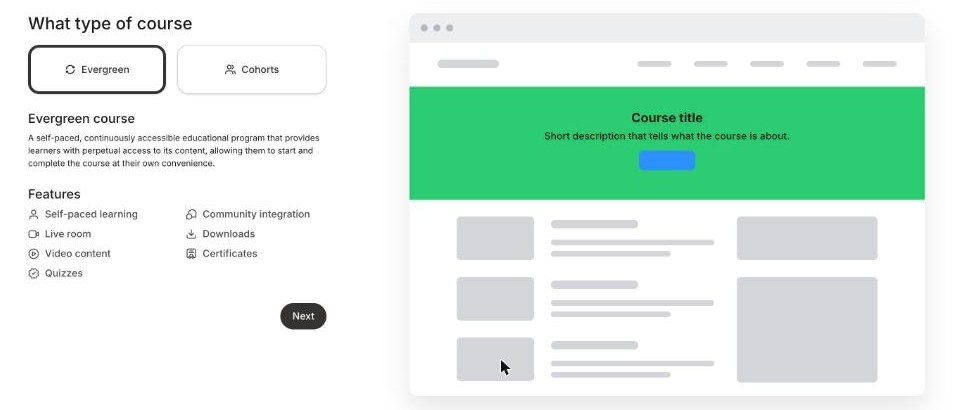
You can choose between two course types. An evergreen course is open all year, and people work through it at their own pace. A cohort course takes a group through the material together from a set start date, with live sessions built into the schedule.4 Kajabi's guide to evergreen and cohort courses covers the differences in more detail.
Evergreen course
- Open for enrolment any time
- Students learn at their own pace
- Live sessions are optional
- Included on every plan
Cohort course
- Each group has a fixed start date
- Everyone follows a set schedule
- Live sessions are built in
- Included on Growth and Pro
Inside either type, you have a good set of teaching tools to work with:
Video, audio and downloads
Each lesson can hold a video or audio file, written notes and files to download.1
Quizzes
Four question types, with optional auto-marking and a passing grade. See Kajabi's notes on course quizzes.5
Drip content
Release modules on a date, or days after someone joins, up to two years ahead. Here are the drip time limits.6
Locked modules
Keep a module closed until a student completes a lesson or passes a quiz. Kajabi explains how to lock course content.9
Certificates
Students get a certificate when they finish, ready to download as a PDF and share. Set up course certificates in minutes.8
Comments, live rooms and community
Students can comment on lessons, join live sessions and move straight into your community.1
Here's my honest take on that list. Most good courses only need modules, lessons and one or two quizzes. The extra tools are there when you need them, and it's fine to leave them switched off at the start.
How do you create a course in Kajabi?
Setting up the shell of a course takes a few minutes. These are the steps from Kajabi's courses overview, in the order you'll see them.1
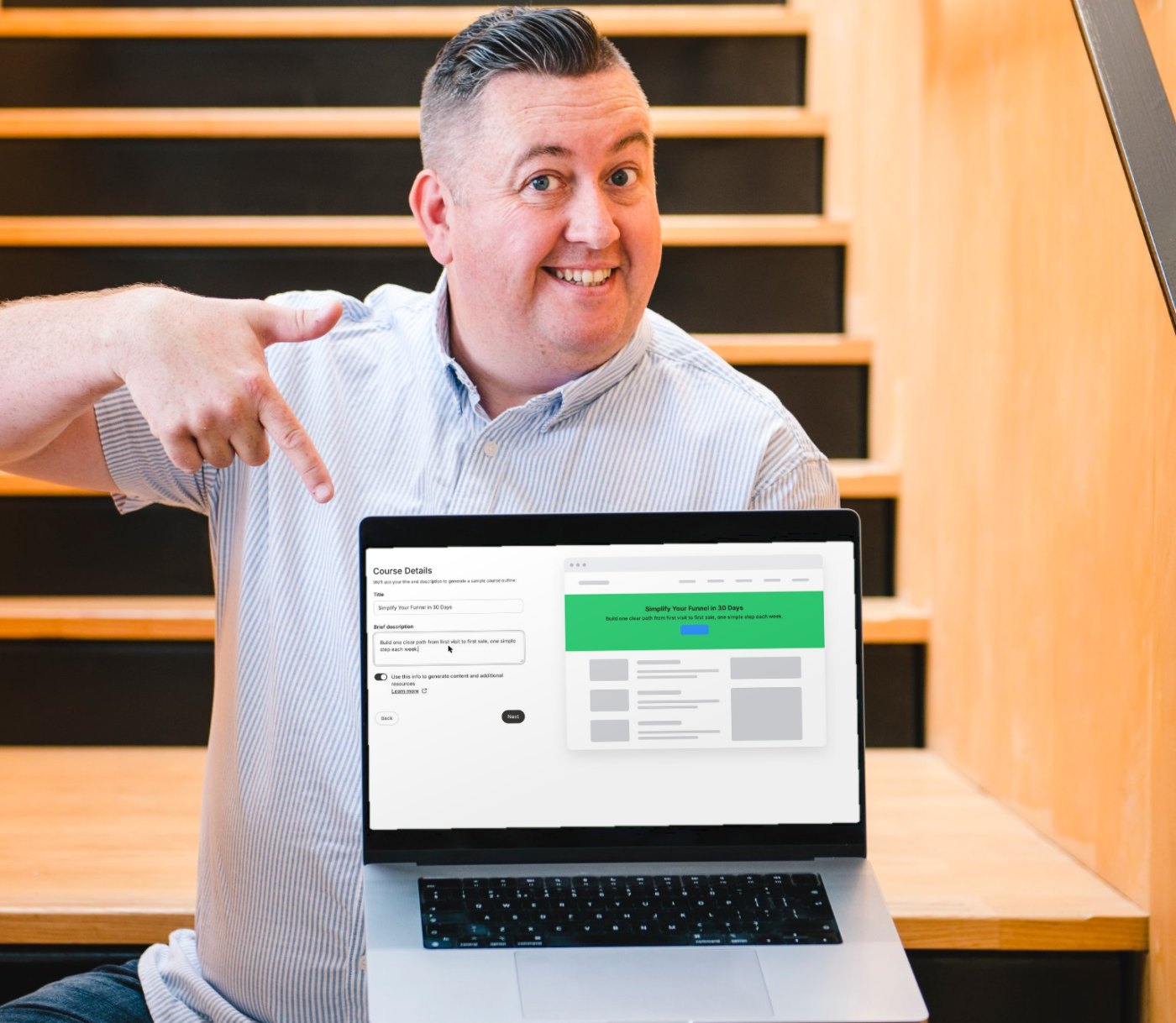
- Start a new courseIn your Kajabi dashboard, go to Products, then Courses, and click New course. Then choose an evergreen or cohort course.
- Add a title and descriptionKeep the description short and clear. Kajabi allows up to 700 characters.
- Decide on the AI draftLeave the AI switch on and Kajabi drafts your modules and lessons. It also creates a landing page, a form and an email to promote the course.
- Pick your coloursChoose a main colour, an accent colour and a thumbnail image.
- Create an offerThis is how people pay. Choose free, a one-time payment, a payment plan or a subscription, or skip it for now.
- Build and previewFrom the course outline, add your modules, lessons and quizzes, then preview everything on desktop and mobile.
My tip: write your outline before you open Kajabi. When you already know your modules, the AI draft becomes something to check against, and you stay in charge of the shape of the course.
Which Kajabi plan do you need for courses?
Every Kajabi plan includes courses. The plans differ in how many products you can sell, how many contacts you can email, and a few extras like cohort courses and your own app. You can compare them all on the Kajabi pricing page.2
Basic
$179/mo
or $143/mo billed yearly
- 5 products
- 2,500 contacts
- Evergreen courses
- Cohort courses
- Your own branded app
Growth
$249/mo
or $199/mo billed yearly
- 50 products
- 25,000 contacts
- Evergreen courses
- Cohort courses
- Your own branded app
Pro
$499/mo
or $399/mo billed yearly
- Unlimited products
- 100,000 contacts
- Evergreen courses
- Cohort courses
- Your own branded app
Prices in US$, checked on 7th November 2026. A product means any course, coaching program, membership, download or podcast you sell.
Kajabi takes no share of your sales on any plan, and every plan comes with a 30-day money-back guarantee.2 If you haven't sold your first course yet, start on Basic. Kajabi gives the same advice on its pricing page, and you can move up the moment you need more.2
The standard free trial lasts 14 days, as Kajabi's trial information page explains.7 Through my partner link you get 30 days instead, which is enough time to build a real first course before you pay anything.
Build your first course free for 30 days.That's double the standard trial, through my partner link.
Start your 30-day trial →How do you keep a Kajabi course simple?
The courses that sell best for my clients are rarely the biggest ones. They solve one clear problem, and they get someone one clear result. That's the thinking behind the framework I teach in Simplify the Funnel®, and I call it the Minimum Viable Funnel.
Definition
Minimum Viable Funnel™
The Minimum Viable Funnel is a term coined by Ant Hodges, author of Simplify the Funnel®. It describes the simplest funnel that can sell: one traffic source, one no-brainer offer, one conversion event and one core offer.
In Kajabi, a course usually becomes the core offer in that funnel. One landing page, one email sequence and one checkout can carry it, and Kajabi holds all of those in the same account. My example course follows the same shape, with one simple step each week, and the later weeks drip out after the first.
Here's how I'd shape the course itself:
- Promise one result that your ideal client wants badly enough to pay for.
- Keep it to three to five modules, with short lessons that each move someone forward.
- Sell it before you finish building it, then record lessons as your first students go through.
- Add a quiz or a workbook only where it helps people take action.
A smaller course is quicker to launch, easier to finish and easier to improve. You can always add a bonus module later, once real students tell you what they need.
“It’s time to reject complexity as strategy. Embrace the power of doing less, but better.”
From Simplify the Funnel® by Ant Hodges
Where does AI help with Kajabi Courses?
The way I use AI is simple. It belongs in the back office, carrying the repeatable jobs, while you stay fully human in the front office where your students meet you.
Back office: let AI help
Front office: stay human
- Your stories and examples
- Your judgement on what to teach
- Your feedback on short answer and file upload quiz questions5
Your stories, your judgement and your feedback are what people actually pay for. Short answer and file upload quiz questions are marked by you and your team, and that's a good thing.5 It's one of the best places to show up personally, so let AI draft the busywork and keep that part for yourself.
Who are Kajabi Courses best for?
Kajabi Courses fits best when the course is part of a wider business. That covers coaches, consultants, authors and experts who also want a website, an email list, a community or coaching in the same place. It also suits people who'd rather spend their time teaching than managing five different tools.
A great fit if you
- Sell your expertise as a coach, author or expert
- Want your course, website and emails in one place
- Plan to add a community or coaching later
Another route may suit you if you
- Build corporate training that must be SCORM compliant3
- Only need to host one free video series
Kajabi says plainly that its courses don't support SCORM, so formal corporate training is the main case where it isn't the right tool.3 And if you only need somewhere to host a single free video series, a full business platform may be more than you need right now.
Try this
Your first 30 days with Kajabi Courses
- Write the one result your course promises, in a single sentence.
- Outline three to five modules on paper before you open Kajabi.
- Start your trial and create the course shell, using the AI draft as a checklist.
- Build one offer, one sales page and one short email sequence around it.
- Invite your first students, record lessons as they go, and improve from their questions.
Kajabi Courses FAQs
Can I try Kajabi Courses for free?
Yes, every new account starts with a free trial. The standard Kajabi trial is 14 days, and signing up through my partner link gives you 30 days.7
Does Kajabi take a cut of my course sales?
No, Kajabi takes no revenue share on any plan. You do pay card processing fees, which start at 2.9% plus 30 cents per US card payment on the Basic plan through Kajabi Payments.2
Can students take my Kajabi course on their phone?
Yes, students can learn on your website, in the free Kajabi mobile app, or in your own branded app on the Pro plan.12
Can I run a live cohort course on the Basic plan?
No, cohort courses need the Growth or Pro plan. Basic includes evergreen courses, which you can still drip out over time.4
Is Kajabi SCORM compliant?
No, Kajabi courses don't support SCORM. That only matters if you're building formal corporate training that has to plug into another learning system.3
More Kajabi guides
See the full Kajabi review for every feature, plan and price in one place. New feature guides are added each week.

About Ant Hodges
Ant Hodges is the author of Simplify the Funnel®, a Kajabi Founder and Partner since 2012, and a winner of the Kajabi Millionaire Hero Award. He has spent more than 20 years running his own businesses, agency and programs, and now helps online business owners, coaches, creators and experts simplify their businesses.
Sources
- Kajabi Help Center (2026) "Courses overview." help.kajabi.com ↩
- Kajabi (2026) "Pricing." kajabi.com/pricing ↩
- Kajabi (2026) "Online Courses." kajabi.com/product/online-courses ↩
- Kajabi Help Center (2026) "Course types: Evergreen vs. Cohort." help.kajabi.com ↩
- Kajabi Help Center (2026) "Course quizzes." help.kajabi.com ↩
- Kajabi Help Center (2026) "Drip Course content time limit." help.kajabi.com ↩
- Kajabi Help Center (2026) "Kajabi trial information." help.kajabi.com ↩
- Kajabi Help Center (2026) "Course completion certificates." help.kajabi.com ↩
- Kajabi Help Center (2026) "Lock content in a Course." help.kajabi.com ↩
All sources checked and live on 7th November 2026.

Every Kajabi feature, explained simply
- Kajabi review: start here
- Kajabi Communities
- New guides added each week
Watch me work in Kajabi
Short walkthroughs from my YouTube channel. Press play to watch here, or open any video on YouTube.

Kajabi MCP + Claude: Building a Landing Page in Kajabi Using AI
Watch on YouTube
Build a High Converting Sales Page in Minutes (on Kajabi)
Watch on YouTube
Kajabi Just Got Expensive (Here's Why That's Actually a Good Thing)
Watch on YouTube
7 Essential Tips for Maximizing Your Kajabi Account
Watch on YouTubeFree email updates
Simplify your business, one email at a time.
Join my email list for simple, practical ideas on Kajabi, marketing and running a business that fits your life.
- New Kajabi guides and tips as soon as they go live
- Fresh blog posts and Less Is The Strategy podcast episodes
- First news of my community, training and events