Home › Kajabi Review › Kajabi Communities
Kajabi Communities review · Updated November 2026Kajabi Communities Review: How to Build a Community That Lasts
What Kajabi Communities can do, what it costs in 2026, and how to keep your community simple, from a Kajabi user who has run his own community on it since 2022.
Start your 30-day Kajabi trial →- Kajabi user since 2012
- 3 Kajabi awards
- 30 days free, double the standard trial
 By Ant HodgesKajabi user since 2012 · Updated 7th November 2026 · 10 minute read
My own community started life on Kajabi in November 2022, and it has lived there ever since. It's called the Simplify Community, and today it uses every part of what Kajabi offers. That means channels, challenges, meetups, live rooms and gamification, all reached on the web or through my own branded app.
Kajabi has recognized that work with its Community Superstar Award and its Foster Belonging Award. So this guide comes from running a real community week in, week out. It walks through what Kajabi Communities can do, how to set one up, what it costs in 2026, and how to keep yours simple enough that members keep coming back.
The short answer
Kajabi Communities gives your members one home for conversation, challenges and live events, inside the same account that runs your website, emails and payments. You can run free and paid tiers in one community, host up to 200 people in a live room, and reward the most active members with points and badges. Every plan includes at least one community, starting at $179 a month, or $143 a month billed yearly. For coaches, experts and authors who want their people in one place, it's the setup I use myself.
On this page
- What are Kajabi Communities?
- What can you do in a Kajabi Community?
- How do you create a community in Kajabi?
- Can you run free and paid tiers?
- Which Kajabi plan do you need for a community?
- How do you keep a Kajabi community simple?
- Where does AI help with Kajabi Communities?
- Who are Kajabi Communities best for?
- Your first 30 days with Kajabi Communities
- Kajabi Communities FAQs
What are Kajabi Communities?
Kajabi Communities is the members' space inside Kajabi. Your people can post, chat, join live events and take part in challenges, and you run all of it from your Kajabi dashboard.1 Members can join on your website, in the Kajabi mobile app, or in your own branded app on the Pro plan.12
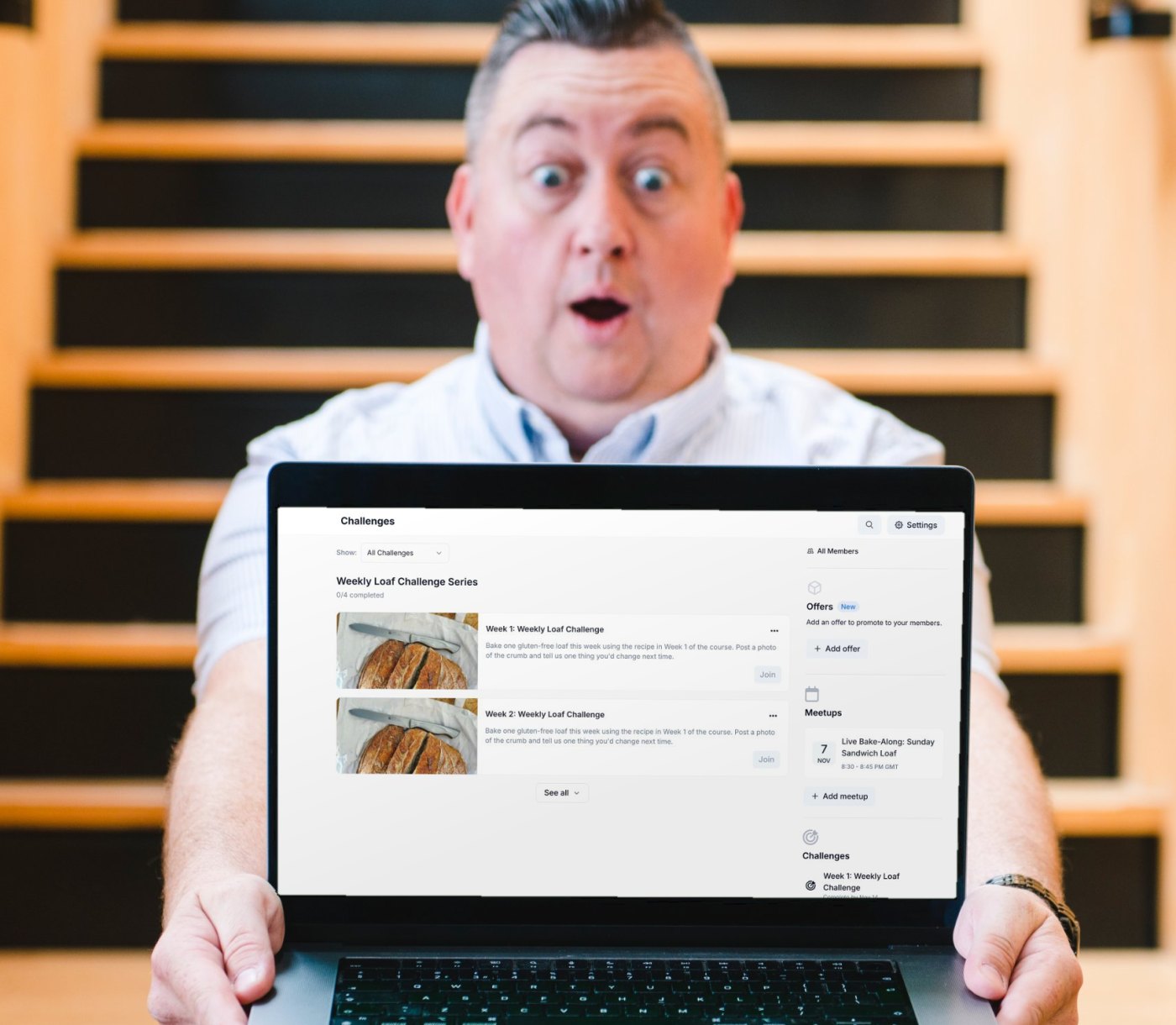
To show you how it looks, I built an example community in my Kajabi partner account. It's called The Gluten-Free Baking Community, and it's led by Emily Chase, a patisserie chef I created for my examples. You'll see her again in other guides, because her community ties in with her example landing page, Gluten-Free Baking Made Simple.
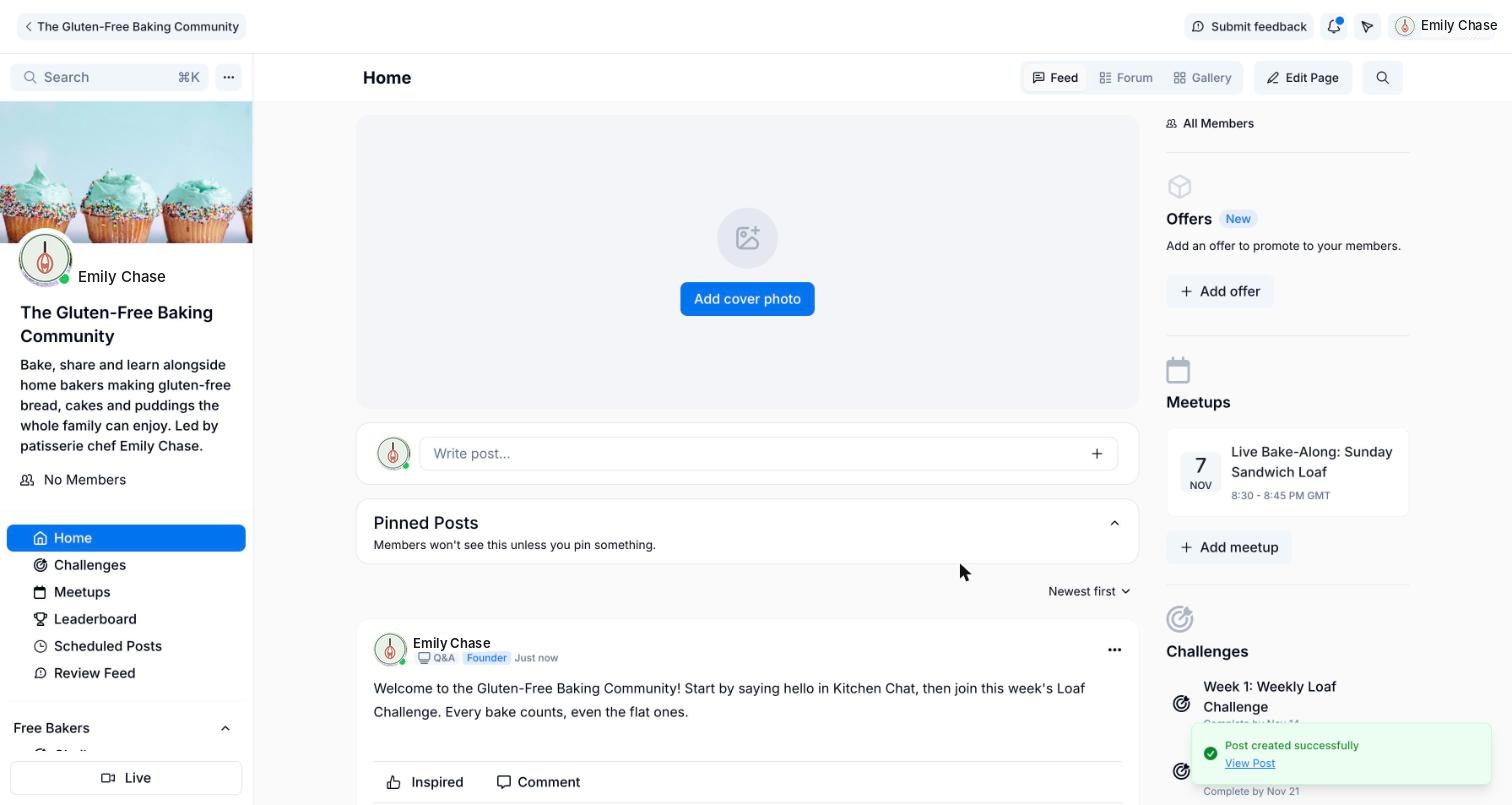
The big win for me is that nothing needs stitching together. Your community sits next to your courses, offers, emails and member profiles, with no third-party tools to connect.1 Kajabi says more than 3 million members are active across more than 30,000 communities, and creators have made over $350 million with them.1
What can you do in a Kajabi Community?
Kajabi gives you a full set of tools, and you can switch each one on when you need it. Here's what you'll find inside.
Channels
Topic spaces set up as a feed of posts or a live chat. Each one can be public, private or read-only. Kajabi shows how to create a channel.7
Meetups and live rooms
Schedule events with a built-in live room for up to 200 people, with screen sharing, breakout rooms and recording. Read about live rooms and events.4
Challenges
One-off or recurring activities your members do together, with optional prizes. Here's how to create a challenge.6
Gamification
Points, titles, badges and a leaderboard that reward people for joining in. Kajabi explains the full gamification settings.5
Announcements and moderation
Send announcements to keep members informed, and manage posts, comments and member activity in one place.1
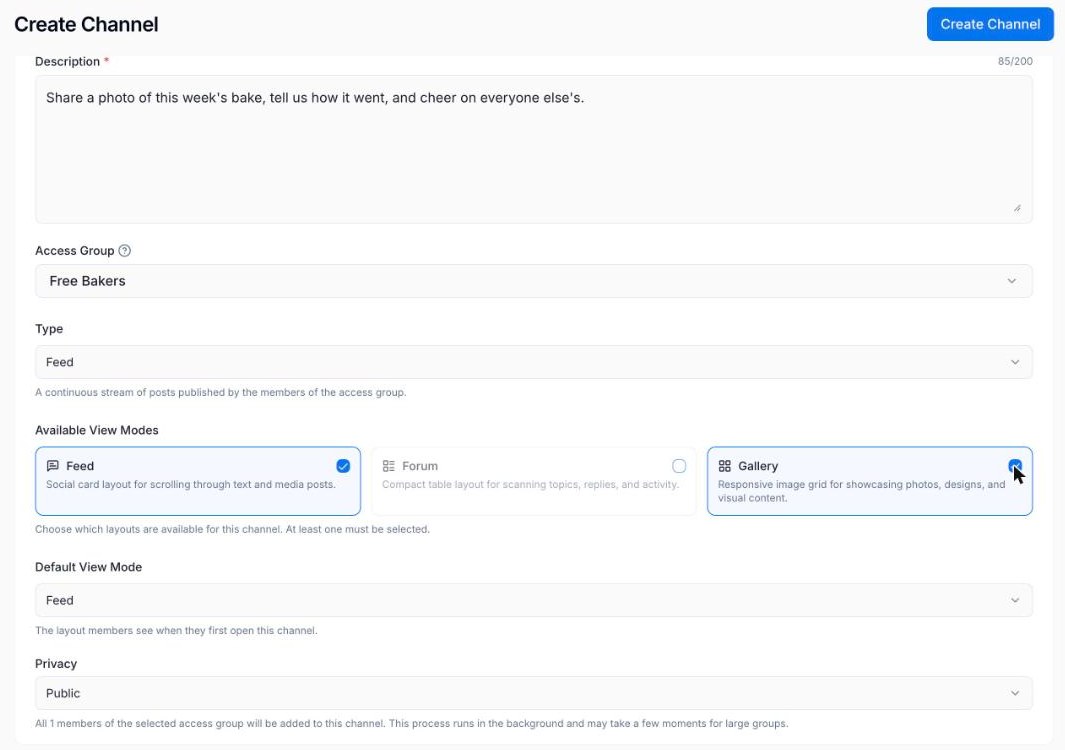
Channels give you more choice than you might expect. A feed channel can show posts as social cards, a forum list or a photo gallery, and members can switch between the layouts you allow. In my example, the weekly bake channel uses the gallery view, so every loaf and cake shows up as a picture.
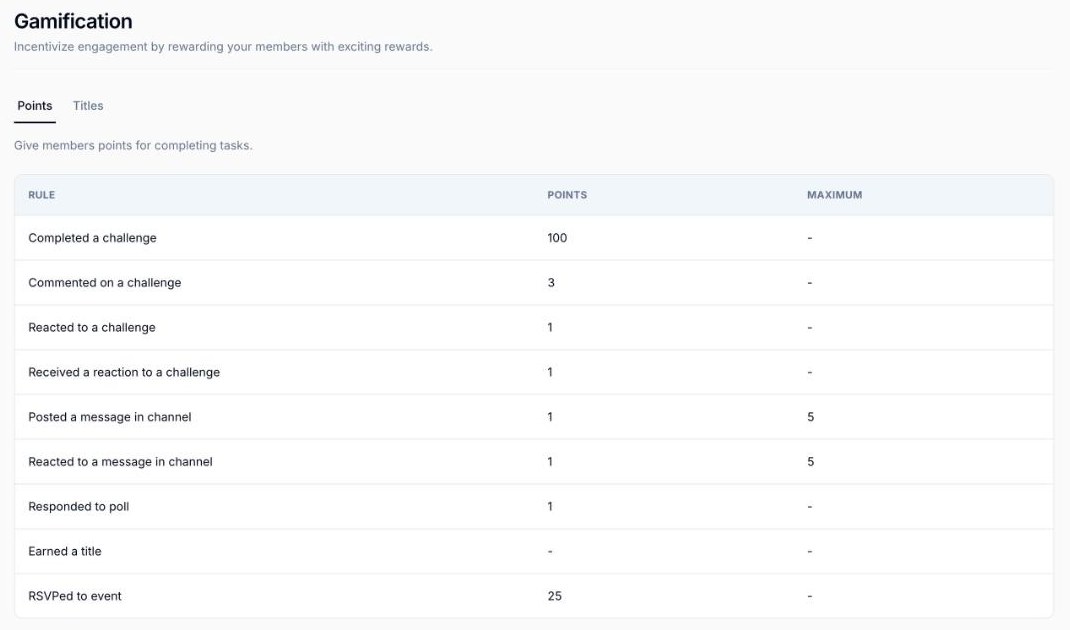
Gamification is the part people often skip, and it's worth a look. Out of the box, a member earns 100 points for completing a challenge, 3 for a comment and 1 for a reaction, and you can change every value.5 Points unlock titles such as Rising Contributor at 500 points, and the leaderboard can show the past 7 days, the past 30 days or all time.5
How do you create a community in Kajabi?
The first version of a community takes about five minutes. These are the steps from Kajabi's guide to building a community, in the order you'll see them.3
- Start a new communityIn your Kajabi dashboard, go to Products, then Community, and click New Community.
- Add the basicsGive it a name, a short description and an image. The name sets your community's web address, which you can change later.
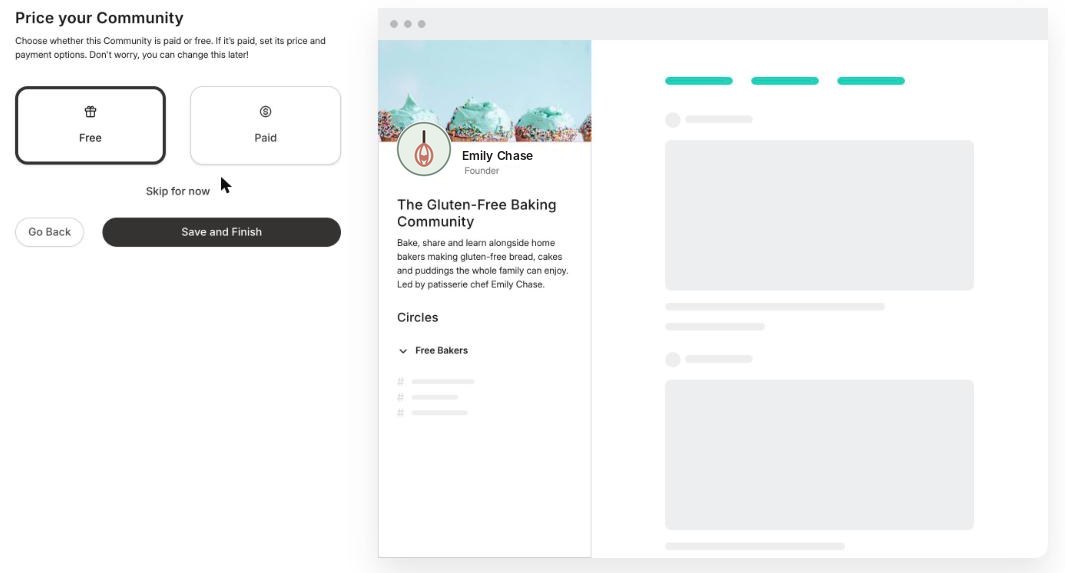
- Name your first access groupThis is the first group of members, like Free Bakers in my example. You can add more groups whenever you like.
- Choose free or paidPick Free or Paid for that group. Kajabi creates the offer for you, and you can change it later.
- Save and finishClick Save and Finish, and your community is ready to shape.
- Add channels, a meetup and a challengeFrom the community settings, create two or three channels, schedule your first meetup and set up a welcome challenge.
My tip: write your welcome post before you invite anyone. Tell new members exactly where to say hello and what to do first, then pin it to the top of the feed. It's the single post every member will read.
Can you run free and paid tiers?
Yes, and this is one of my favorite parts. Kajabi uses access groups to split one community into tiers, and each group has its own offer.3 You can keep some channels open to everyone and save others for paying members. Every plan allows unlimited access groups, and your community doesn't count towards your product limit.3
You can also start free and add a paid tier later. Kajabi won't charge your free members when you do, so nobody gets a surprise.1 A community can be sold on its own, bundled with a course, or offered as a monthly or yearly membership.1
Which Kajabi plan do you need for a community?
Every Kajabi plan includes communities. Basic and Growth include one community, Pro includes three, and only Pro adds your own branded app. You can compare everything on the Kajabi pricing page.2
Basic
$179/mo
or $143/mo billed yearly
- 1 community
- 5 products
- 2,500 contacts
- Unlimited access groups
- Your own branded app
Growth
$249/mo
or $199/mo billed yearly
- 1 community
- 50 products
- 25,000 contacts
- Unlimited access groups
- Your own branded app
Pro
$499/mo
or $399/mo billed yearly
- 3 communities
- Unlimited products
- 100,000 contacts
- Unlimited access groups
- Your own branded app
Prices in US$, checked on 7th November 2026. Card fees through Kajabi Payments start at 2.9% plus 30 cents per US card payment on Basic.
Kajabi takes no share of your sales on any plan, and every plan comes with a 30-day money-back guarantee.2 One community is plenty for most people, because access groups let you build tiers inside it. Move up to Pro when you want your own app in the App Store, or a second and third community.
The standard free trial lasts 14 days, as Kajabi's trial information page explains.8 Through my partner link you get 30 days instead, which is long enough to run your first challenge and your first meetup before you pay anything.
Build your community free for 30 days.That's double the standard trial, through my partner link.
Start your 30-day trial →How do you keep a Kajabi community simple?
The communities that thrive are rarely the ones with the most channels. They have a clear reason to show up and a small rhythm members can count on. That idea comes from the Engage part of a model I teach in Simplify the Funnel®, called SEED Marketing.
Definition
SEED Marketing™
SEED Marketing is a model created by Ant Hodges, author of Simplify the Funnel®. It says every piece of content should Shape your expertise, Engage your audience, Echo your values and Deliver something people can act on.
A community is where Engage really comes alive. The people who grow fastest online usually create the most conversations, and a community gives those conversations a home. My example keeps it to a Kitchen Chat channel for hellos, a gallery for weekly bakes and one weekly challenge.
Here's how I'd shape a new community:
- Start with two or three channels, and add more only when members ask for them.
- Run one challenge each week, so there's always something to do.
- Hold one live meetup a month, and record it for anyone who misses it.
- Reply to every new member personally in their first week.
A small rhythm is easier to keep going, and members feel the difference straight away. When people know a challenge lands every Monday and a meetup happens every month, they build the habit of showing up.
“The ones who succeed aren’t necessarily creating the most content. They’re creating the most conversations.”
From Simplify the Funnel® by Ant Hodges
Where does AI help with Kajabi Communities?
My belief here is very simple. AI creates movement, and humans create momentum. AI belongs in the back office doing the repeatable jobs, while you stay fully human at the front where your members meet you. There’s more on this in my post Built to Be Human.
Back office: let AI help
- Draft challenge ideas and prompts
- Turn meetup recordings into notes
- Kajabi Cofounder and the Kajabi MCP link to tools like Claude, on every plan2
Front office: stay human
- Welcoming new members
- Replying to posts and comments
- Hosting your live meetups
Members join a community to feel seen by you and by each other. Let AI help with the planning, then show up yourself for the welcomes, the replies and the live calls. That human part is what people remember, and it's what keeps them renewing.
Who are Kajabi Communities best for?
Kajabi Communities fits best when the community is part of a wider business. That covers coaches, course creators, authors and experts who want their courses, coaching, emails and members in the same place. It also suits anyone who wants to charge for membership without paying for a separate community tool.
A great fit if you
- Want a paid membership or a free community
- Already sell courses or coaching on Kajabi
- Like the idea of live calls and challenges
Another route may suit you if you
- Need more than 200 people live in one room
- Only want a free group chat with no paid tier
Live rooms hold up to 200 people at once, so very large live events may need a webinar tool alongside.4 And if all you want is a free group chat with no plans to charge, a full business platform may be more than you need right now.
Try this
Your first 30 days with Kajabi Communities
- Write one sentence on why someone would join your community.
- Start your trial and create the community with one free access group.
- Add two or three channels, a pinned welcome post and a welcome challenge.
- Schedule your first live meetup and invite your first ten members personally.
- Reply to every post in week one, then add a paid tier when members ask for more.
Kajabi Communities FAQs
Can I try Kajabi Communities for free?
Yes, every new account starts with a free trial. The standard Kajabi trial is 14 days, and signing up through my partner link gives you 30 days.8
Can I have free and paid members in the same community?
Yes, access groups let you run free and paid tiers inside one community, each with its own offer. Every Kajabi plan allows unlimited access groups.3
How many people can join a Kajabi live room?
Up to 200 people can be in a community live room at once. Recordings save in 1080p by default and appear in your meetups once they finish processing.4
Does a community count towards my Kajabi product limit?
No, your community doesn't count against the product limit on your plan, so you keep every product slot for courses, coaching and downloads.3
How many communities can I have on Kajabi?
The Basic and Growth plans include one community each, and the Pro plan includes three. Pro also adds your own branded app.2
More Kajabi guides
See the full Kajabi review for every feature, plan and price in one place, or read the Kajabi Courses guide next. New feature guides are added each week.

About Ant Hodges
Ant Hodges is the author of Simplify the Funnel®, a Kajabi Founder and Partner since 2012, and a winner of the Kajabi Millionaire Hero Award. He runs the Simplify Community on Kajabi, and helps online business owners, coaches, creators and experts simplify their businesses.
Sources
- Kajabi (2026) "Communities." kajabi.com/product/communities ↩
- Kajabi (2026) "Pricing." kajabi.com/pricing ↩
- Kajabi Help Center (2026) "Build Kajabi Communities." help.kajabi.com ↩
- Kajabi Help Center (2026) "Host Live Rooms and events in a Community." help.kajabi.com ↩
- Kajabi Help Center (2026) "Community Settings: Gamification." help.kajabi.com ↩
- Kajabi Help Center (2026) "Create a Community Challenge." help.kajabi.com ↩
- Kajabi Help Center (2026) "Create a Community Channel." help.kajabi.com ↩
- Kajabi Help Center (2026) "Kajabi trial information." help.kajabi.com ↩
All sources checked and live on 7th November 2026.

Every Kajabi feature, explained simply
- Kajabi review: start here
- Kajabi Courses
- New guides added each week
Watch me work in Kajabi
Short walkthroughs from my YouTube channel. Press play to watch here, or open any video on YouTube.

Discover the Key to Success: Building a Community for Business Growth
Watch on YouTube
Kajabi MCP + Claude: Building a Landing Page in Kajabi Using AI
Watch on YouTube
Kajabi Just Got Expensive (Here's Why That's Actually a Good Thing)
Watch on YouTube
7 Essential Tips for Maximizing Your Kajabi Account
Watch on YouTubeFree email updates
Simplify your business, one email at a time.
Join my email list for simple, practical ideas on Kajabi, marketing and running a business that fits your life.
- New Kajabi guides and tips as soon as they go live
- Fresh blog posts and Less Is The Strategy podcast episodes
- First news of my community, training and events