Home › Kajabi Review › Kajabi Email Marketing
Kajabi Email Marketing review · Updated November 2026Kajabi Email Marketing Review: How to Send Emails People Want to Open
Broadcasts, sequences, automations and event emails explained, with 2026 prices, from a Kajabi user who moved all his email marketing to Kajabi in 2016.
Start your 30-day Kajabi trial →- Kajabi user since 2012
- 3 Kajabi awards
- 30 days free, double the standard trial
 By Ant HodgesKajabi user since 2012 · Updated 7th November 2026 · 12 minute read
Back in 2016, I moved all of my email marketing from Infusionsoft to Kajabi, and I've never looked back. Today my list runs into the thousands, and every email I send goes out from the same account that runs my website, products and payments.
In all that time I've never had a delivery problem. The tracking and analytics are far better than anything I used before, and building emails, sequences, events and automations is simple. Add in Kajabi Cofounder, the Kajabi MCP and Expert Agents, and email marketing inside Kajabi becomes world-class. This guide walks through every part of Kajabi email marketing, how I use each one, what it costs in 2026, and how to keep your emails simple.
The short answer
Kajabi email marketing gives you broadcasts, sequences, automations, event emails and announcements in the same account as your website, products and checkout. Every plan includes unlimited marketing emails, and Kajabi reports a 99% deliverability rate across more than 10 billion emails a year. Plans start at $179 a month, or $143 a month billed yearly. For coaches, experts and authors who want their emails and their business in one place, it's the email platform I use every day.
On this page
- What is Kajabi email marketing?
- What kinds of email can you send?
- How do email broadcasts work?
- How do email sequences work?
- How do automations work?
- How do event emails work?
- What are product and affiliate announcements?
- How do you track your email results?
- Which Kajabi plan do you need for email?
- How do you keep email marketing simple?
- Where does AI help with Kajabi email?
- Kajabi email marketing FAQs
What is Kajabi email marketing?
Kajabi email marketing is the email system built into every Kajabi account. You write and send your emails from the Marketing tab, and they go to the same contacts who join your list, buy your products and log in to your courses.1 Kajabi offers more than 20 designed email templates, a visual editor, and simple text emails that look like a personal note.2
To show you how it works, I built a full email setup for my example business in my Kajabi partner account. It belongs to Emily Chase, a patisserie chef I created for my examples, who runs The Gluten-Free Baking Community and the course Gluten-Free Baking Made Simple.
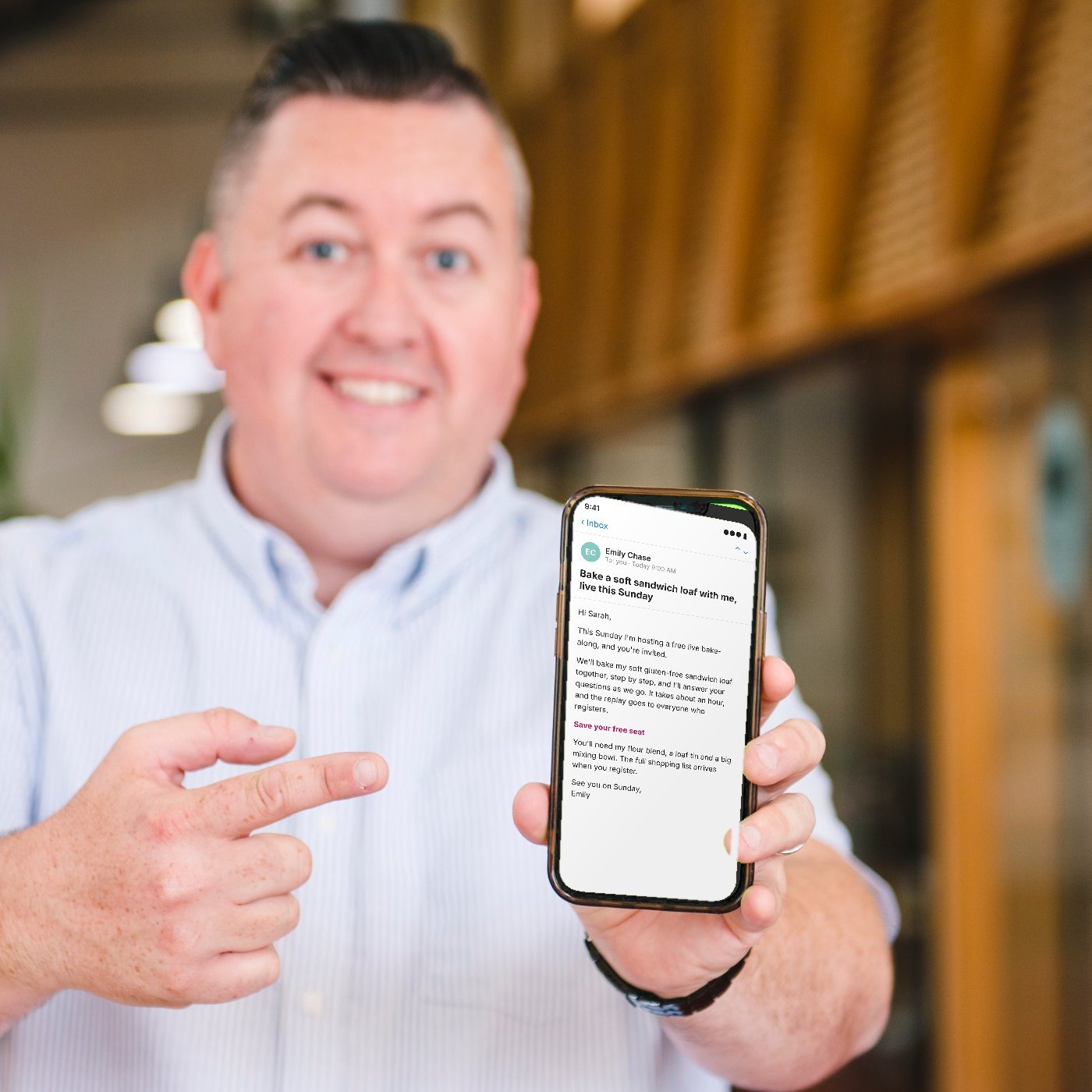
The part I value most is that everything already talks to each other. When someone fills in a form, buys an offer or finishes a lesson, Kajabi knows straight away and can send the right email, with no extra tools to connect.3
What kinds of email can you send?
Kajabi gives you six ways to send email, and each one has a clear job. My own business uses all six of them.
Broadcasts
A single email you send to your list or a segment, right away or at a set time.2
Sequences
A series of emails written in advance, sent on a schedule from the day someone joins.2
Automations
When something happens, Kajabi responds, like adding a tag or starting a sequence.3
Event emails
Confirmations, reminders and follow-ups timed around a live event date.4
Product announcements
News for the people inside a course, with an optional email to every member.6
Affiliate announcements
One message emailed to every affiliate promoting your products.7
Here's how I split the three I use most. Broadcasts are for specific campaigns, sequences are for nurturing, and automations respond to what people actually do. That simple rule keeps my email marketing clear, and it's a good place for you to start too.
How do email broadcasts work?
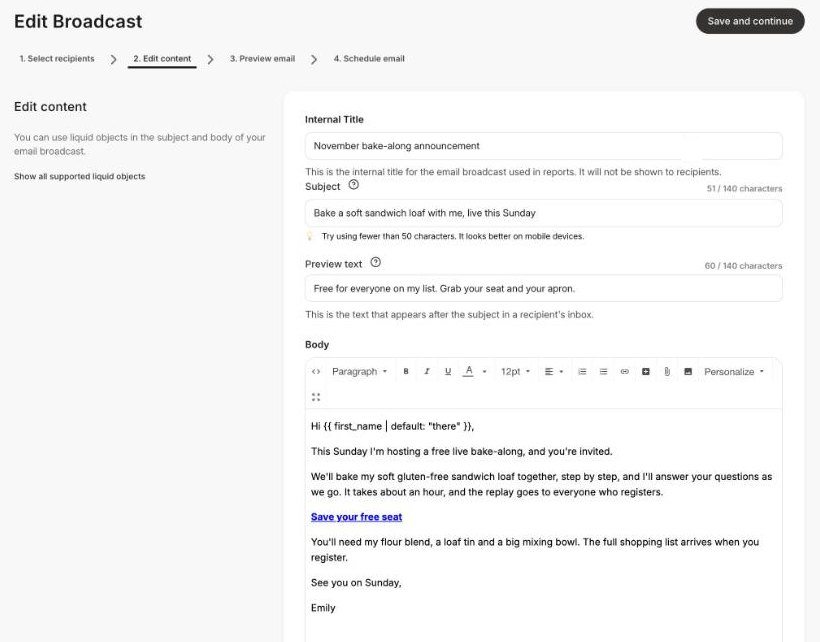
A broadcast is one email sent to your whole list or to a chosen segment. You can send it straight away or schedule it for later, and you can A/B test broadcasts to see which version works best.2 These are the steps from Kajabi's email campaigns overview.
- Start a new broadcastGo to Marketing, then Email Campaigns, click New Email Campaign and choose Create Email Broadcast.
- Choose your recipientsSend to all contacts or to a segment, such as everyone with a certain tag. Kajabi only sends to contacts who opted in.
- Write the emailAdd your subject line, preview text and message in the visual editor or as a simple text email.
- Preview and scheduleSend yourself a test, then send it now or pick a date and time.
How do email sequences work?
A sequence is a set of emails you write once, and Kajabi sends them to each new subscriber on their own timeline. The first email can go out immediately, and the gaps between the rest can be hours, days or months.2 This is where my nurturing happens.
Emily's welcome sequence has five emails. It delivers her free recipe pack, shares her flour blend, fixes a common baking problem, invites people to her live bake-along, and then introduces her course.
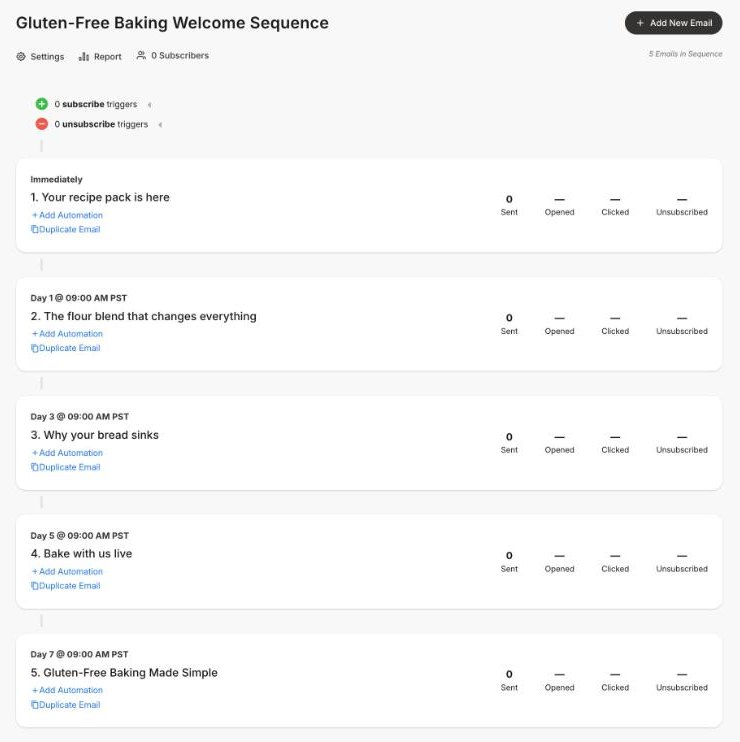
My tip: write your sequence as one conversation spread over a week. Each email should give one helpful idea and point to one next step, so nobody ever wonders what to do next.
How do automations work?
Automations use simple When and Then logic. When something happens, such as a form being submitted or an offer being bought, Then Kajabi takes an action, like adding a tag, sending an email or starting a sequence.3 Kajabi's automations overview lists the triggers and actions.
Emily's automation is the engine behind her list. When someone requests her recipe pack, Kajabi tags them and starts the welcome sequence, all without her lifting a finger.
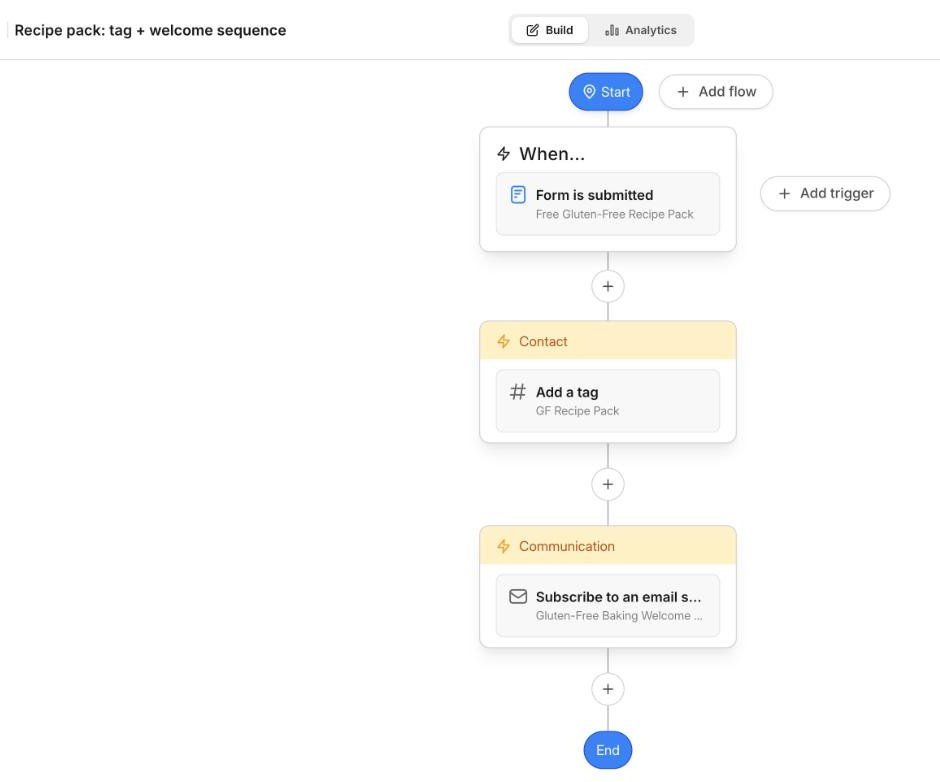
Every plan includes basic automations, which you add inside forms, offers, emails, events and lessons. The Growth and Pro plans add advanced automations, with conditions, branches and a full automations area in the Marketing tab.3
How do event emails work?
Event emails are timed around a date, so they work perfectly for webinars, live calls and workshops. You can send emails at registration, before the event, at the start time and after it ends, and confirmation emails can include add-to-calendar links.4 Kajabi's events overview covers the details.
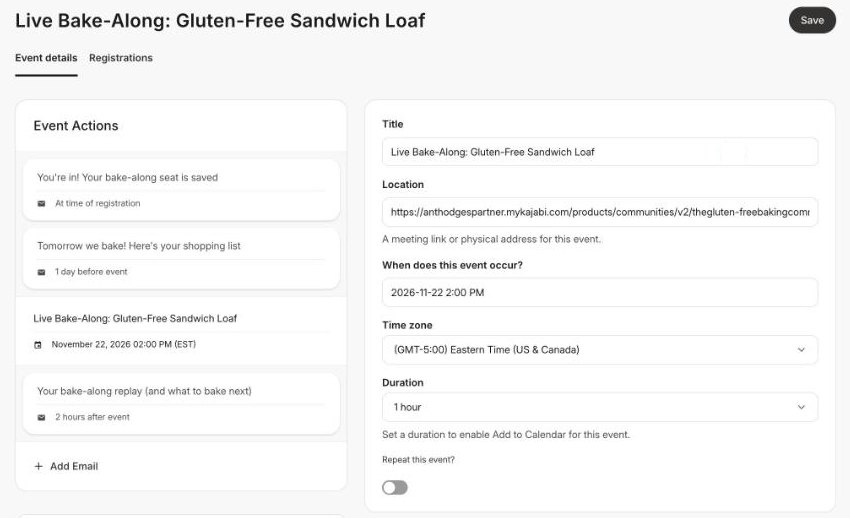
My own live sessions run on events all the time. Once the emails are set up, every registrant gets the right message at the right moment, and I can focus on the session itself.
What are product and affiliate announcements?
Product announcements let you share news with the people inside a course, such as a new lesson or an upcoming live call. Members see the announcement in their library, and you can tick a box to email it to them as well.6 Here's how to send a course announcement.
Affiliate announcements work the same way for the people who promote your products. One announcement goes to every affiliate by email, which is perfect for launch dates and new swipe copy.7 Kajabi's affiliates overview explains the program, which is available on the Growth and Pro plans.
How do you track your email results?
This is where Kajabi really shines for me. Every broadcast and sequence email shows how many were sent, delivered, opened and clicked, along with unsubscribes and bounces.5
Better still, Kajabi tracks the customers and net revenue each email brings in. If someone buys within 30 days of clicking a link in your email, the sale is credited to that email.5 You can see exactly which emails make money, which is the number that matters most. Kajabi's email metrics overview explains each one.
Which Kajabi plan do you need for email?
Every plan includes unlimited marketing emails. The plans differ in how many contacts you can have, and in access to advanced automations and the affiliate program. You can compare them on the Kajabi pricing page.8
Basic
$179/mo
or $143/mo billed yearly
- 2,500 contacts
- Unlimited marketing emails
- Basic automations
- Advanced automations
- Affiliate program
Growth
$249/mo
or $199/mo billed yearly
- 25,000 contacts
- Unlimited marketing emails
- Basic automations
- Advanced automations
- Affiliate program
Pro
$499/mo
or $399/mo billed yearly
- 100,000 contacts
- Unlimited marketing emails
- Basic automations
- Advanced automations
- Affiliate program
Prices in US$, checked on 7th November 2026. Contacts means the people on your list.
Kajabi takes no share of your sales on any plan, and every plan comes with a 30-day money-back guarantee.8 Start on Basic while your list is under 2,500 people, then move to Growth when you need more contacts, advanced automations or affiliates.
The standard free trial lasts 14 days, as Kajabi's trial information page explains.9 Through my partner link you get 30 days, which is plenty of time to build your first sequence and send your first broadcast.
Build your email marketing free for 30 days.That's double the standard trial, through my partner link.
Start your 30-day trial →How do you keep email marketing simple?
The email setups that work best for my clients have very few moving parts. One way in, one welcome sequence and one clear offer will outperform a tangle of campaigns. That's the thinking behind the framework I teach in Simplify the Funnel®, the Minimum Viable Funnel.
Definition
Minimum Viable Funnel™
The Minimum Viable Funnel is a term coined by Ant Hodges, author of Simplify the Funnel®. It describes the simplest funnel that can sell: one traffic source, one no-brainer offer, one conversion event and one core offer.
Email is usually the conversion event in that funnel. Emily's setup is the whole thing in miniature: one form, one automation, one five-email sequence and one course. Here's how I'd shape your first email setup:
- Start with one free resource and one form to grow your list.
- Write one welcome sequence of five emails before anything else.
- Use one automation to tag new subscribers and start the sequence.
- Send a broadcast each week, and check which emails bring in sales.
“It’s time to reject complexity as strategy. Embrace the power of doing less, but better.”
From Simplify the Funnel® by Ant Hodges
Where does AI help with Kajabi email?
My belief is that AI creates movement, and humans create momentum. AI belongs in the back office doing the repeatable work, while you stay fully human in the emails your readers actually open. There’s more on this in my post Built to Be Human.
Back office: let AI help
Front office: stay human
- Your stories and opinions
- Your replies when readers write back
- Your final check before anything sends
Cofounder drafts automations for you to review, and you publish them yourself, which is exactly how it should be.10 Kajabi's Cofounder overview explains what it can do. Let AI handle the setup, then make sure every email sounds like you.
Who is Kajabi email marketing best for?
Kajabi email marketing fits best when your emails sell your own products and services. That covers coaches, course creators, authors and experts who want their list, products and payments in one place, with sales tracked back to each email.
A great fit if you
- Sell courses, coaching, memberships or a community
- Want to see which emails bring in sales
- Would like one tool in place of several
Another route may suit you if you
- Only need a newsletter with nothing to sell
- Have a list far larger than 100,000 contacts
If you only want to send a free newsletter, a dedicated newsletter tool may be all you need. And very large lists beyond the Pro plan's 100,000 contacts are worth discussing with Kajabi directly.8
Try this
Your first 30 days with Kajabi email
- Create one free resource your ideal client would love to download.
- Start your trial and build one form and one landing page for it.
- Write a five-email welcome sequence that ends with your offer.
- Add an automation that tags new subscribers and starts the sequence.
- Send one broadcast a week, then check which emails led to sales.
Kajabi email marketing FAQs
Does Kajabi limit how many emails I can send?
No, every Kajabi plan includes unlimited marketing emails. The plans differ in how many contacts you can have, from 2,500 on Basic to 100,000 on Pro.8
Can Kajabi replace Mailchimp, Kit or Infusionsoft?
For most coaches and experts, yes. Kajabi includes broadcasts, sequences, automations and event emails, and it ties each sale back to the email that drove it.25
What's the difference between a broadcast and a sequence?
A broadcast is one email sent to many people at once. A sequence is a series of emails each subscriber receives on their own schedule after they join.2
Can I try Kajabi email marketing for free?
Yes, every new account starts with a free trial. The standard trial is 14 days, and signing up through my partner link gives you 30 days.9
Which plan do I need for advanced automations?
Advanced automations, including conditions and the full automations area, are on the Growth and Pro plans. Basic includes basic automations inside forms, offers, emails and events.3
More Kajabi guides
See the full Kajabi review for every feature, plan and price in one place, or read the Kajabi Communities guide next. New feature guides are added each week.
About Ant Hodges
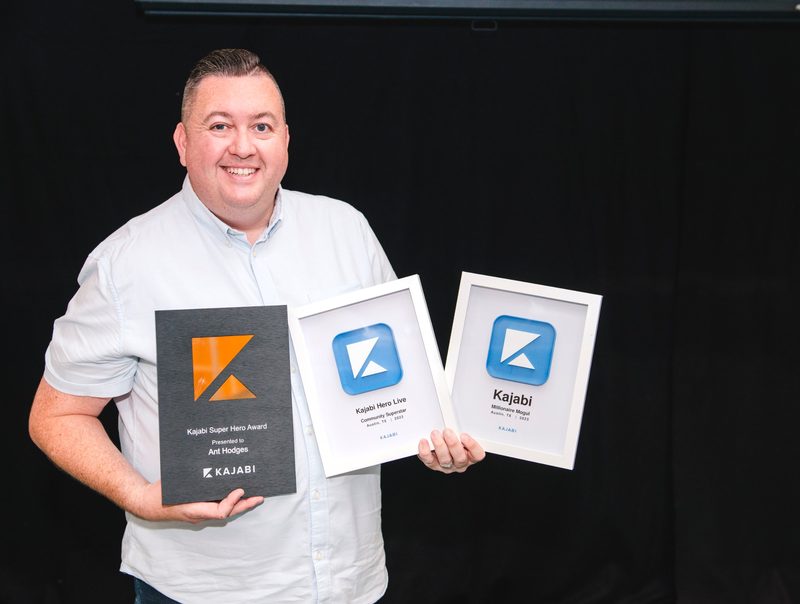
Ant Hodges is the author of Simplify the Funnel®, a Kajabi Founder and Partner since 2012, and a winner of the Kajabi Millionaire Hero Award. He has run all of his email marketing on Kajabi since 2016, and helps online business owners, coaches, creators and experts simplify their businesses.
Sources
- Kajabi (2026) "Email Marketing." kajabi.com/features/email-marketing ↩
- Kajabi Help Center (2026) "Email Campaigns overview." help.kajabi.com ↩
- Kajabi Help Center (2026) "Automations overview." help.kajabi.com ↩
- Kajabi Help Center (2026) "Events overview." help.kajabi.com ↩
- Kajabi Help Center (2026) "Email Metrics overview." help.kajabi.com ↩
- Kajabi Help Center (2026) "Send an Announcement within a Course." help.kajabi.com ↩
- Kajabi Help Center (2026) "Affiliates overview." help.kajabi.com ↩
- Kajabi (2026) "Pricing." kajabi.com/pricing ↩
- Kajabi Help Center (2026) "Kajabi trial information." help.kajabi.com ↩
- Kajabi Help Center (2026) "Cofounder overview." help.kajabi.com ↩
All sources checked and live on 7th November 2026.

Every Kajabi feature, explained simply
- Kajabi review: start here
- Kajabi Courses
- Kajabi Communities
- New guides added each week
Watch me work in Kajabi
Short walkthroughs from my YouTube channel. Press play to watch here, or open any video on YouTube.
The Ultimate Guide to Kajabi Automations for Multiple Event Dates
Watch on YouTube
How to Build an Email List From Scratch FAST - With KAJABI
Watch on YouTube
Tagging and Automations in Kajabi
Watch on YouTube
How to Create Add-to-Calendar Links in Kajabi Emails and Landing Pages
Watch on YouTubeFree email updates
Simplify your business, one email at a time.
Join my email list for simple, practical ideas on Kajabi, marketing and running a business that fits your life.
- New Kajabi guides and tips as soon as they go live
- Fresh blog posts and Less Is The Strategy podcast episodes
- First news of my community, training and events