Home › Kajabi Review › Kajabi Website Builder
Kajabi Website Builder review · Updated November 2026Kajabi Website Builder Review: Build a Website That Sells
Page editors, templates, Nova and AI, domains, blogging and 2026 prices, from a Kajabi user who moved every one of his sites from WordPress to Kajabi.
Start your 30-day Kajabi trial →- Kajabi user since 2012
- 3 Kajabi awards
- 30 days free, double the standard trial
 By Ant HodgesKajabi user since 2012 · Updated 8th November 2026 · 16 minute read
WordPress was my weapon of choice for years. Then in 2016 Kajabi released what we all called "New Kajabi", and I went all in. My first pages were built in the classic editor, and when the new page builder arrived, it quickly became the tool I reach for whenever I design a web page.
Today every one of my sites runs on Kajabi, and I'm not looking anywhere else. The biggest change came recently, when the Kajabi MCP met Claude. Now I can take written copy and my own 19-part sales page framework, and have the whole page built out for me in Kajabi. That one change has saved me days of work. This guide covers the Kajabi website builder in full: the page editors, templates, domains, blogging, SEO, what it costs in 2026, and how to keep your site simple.
The short answer
Yes, you can build your whole website on Kajabi, and it's very good for coaches, experts and course creators. The website builder gives you a homepage, about, contact, blog and store pages, plus unlimited landing pages, all connected to your products, emails and checkout. Every plan includes a custom domain, and plans start at $179 a month, or $143 a month billed yearly. The standard trial is 14 days, and through my partner link you get 30 days.
On this page
- What is the Kajabi website builder?
- Which page editor should you use?
- How do sections and blocks work?
- What can you put on a page?
- How do you build a website on Kajabi?
- What is Nova, and how does AI build pages?
- Can you use your own domain, a blog and SEO?
- Which Kajabi plan do you need for your website?
- How do you keep your website simple?
- Where does AI help with your Kajabi website?
- Kajabi website builder FAQs
What is the Kajabi website builder?
Kajabi describes its website builder as the front door to your whole business, with no code needed and your own domain included.1 It is the editor for the main pages of your site, and one template controls all of those pages, so your fonts, colours and buttons stay consistent from the homepage to the blog.2
To show you how it works, I built a homepage for my example business, all inside Kajabi. It belongs to Emily Chase, a patisserie chef I created for my examples, who runs The Gluten-Free Baking Community and the course Gluten-Free Baking Made Simple.
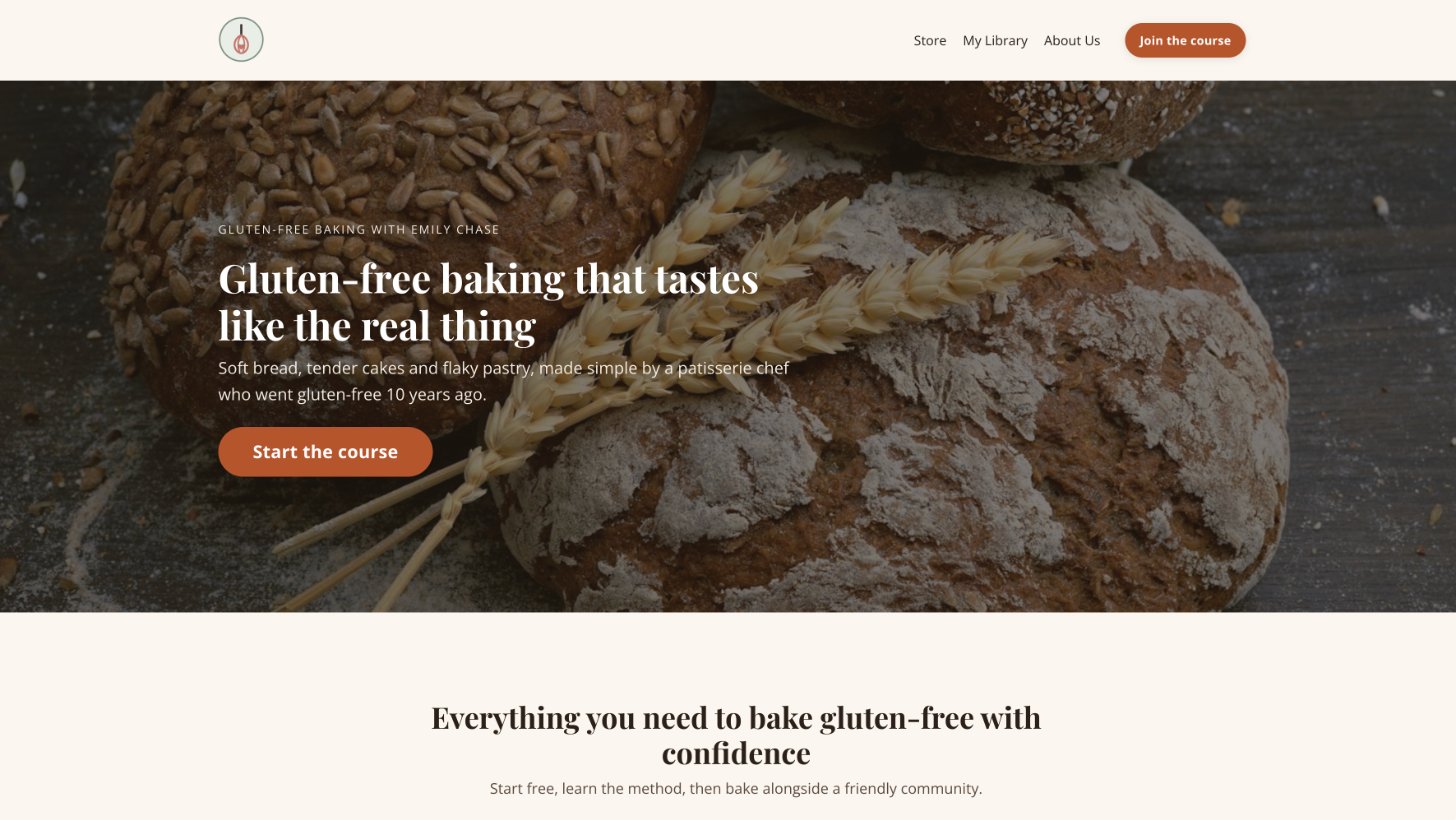
Your site is made of two kinds of page. Website pages share one template and include Home, About, Contact, Blog, Store, Library and Login. Landing pages stand alone, so you can style each one for a single job, like a sales page or a free download.2 Every page connects to the rest of your business, so a form on your homepage can tag a new subscriber and start an email sequence straight away.1
Website pages
Home, About, Contact, Blog, Store and Library, all styled by one template.2
Landing pages
Standalone pages for sales, opt-ins and events, unlimited on every plan.
Blog
Posts with tags, scheduling and their own SEO settings.9
Which page editor should you use?
Kajabi has one editor with three templates behind it, and the template decides which sections and settings you see.3 This matters, because older guides often show the classic editor. Here's the current picture, from Kajabi's page editors overview.
Nova
The newest template, built for AI. You describe the page and it gets built for you. It works on landing pages only for now.3
Encore
The website builder Kajabi keeps developing, with the most options. Use it for your website pages.3
Premier
The older template, now listed as legacy. Kajabi still supports it but no longer develops it.3
My advice here is very simple. Build your website pages in Encore, and try Nova for your next landing page. Every screenshot in this guide shows those two current builders.
How do sections and blocks work?
Every Kajabi page is built from two simple pieces. Sections are the horizontal bands that run down the page, and blocks are the things you put inside them, like text, images, buttons and forms.4 Think of a section as a shelf and the blocks as the items you place on it. Move a shelf and everything on it moves too.
Each section sits on a 12-column grid. A block can be any width from one column to all twelve, so three blocks four columns wide sit neatly side by side.5 That's exactly how the three cards in the middle of Emily's homepage are laid out.
You can start with a ready-made section or a blank one. Kajabi offers more than 45 preset sections with the layout already done, and a custom section starts empty so you can add your own blocks.4 These are the main groups of presets you'll find when you click Add section:
Basic Content
Simple text sections, text with a button underneath, or a form next to some text.
Hero
The big opening section of a page, with a background and a countdown, form, image or video on top.
Features
Feature cards or feature columns that show visitors what you offer.
Carousel
Images, testimonials or videos that slide across the page one after another.
Marketing and Events
Forms, event blocks and other tools that grow your list and fill your events.
Custom
A blank section for your own choice of blocks, or a section for your own code.
Managing your sections is very simple. You can rename, duplicate, hide or delete any section, and drag sections up and down to change the order.4 Hiding is handy, because the section stays in the editor while it disappears from the live page, which is perfect for launch content you're not ready to show. A page can hold up to 50 sections, which is far more than any simple page needs.
Inside each section, the layout settings control how the blocks line up. You can make every block in a row the same height, and align them to the top, middle or bottom, or to the left, centre or right.5 Desktop and mobile layouts are set separately, so you can tidy a section for phones without changing it on a laptop.2
What can you put on a page?
Blocks are where your content lives, and Kajabi's blocks guide lists every type.5 To add one, open a section, click Add block, pick the type and save. Here's what each block does, in plain English, grouped by the job it does on your page.
Words and structure
Text
Headings, paragraphs and lists, with an optional button underneath. Most of your words will live here.
Feature
An image, a short message and an optional button, which is ideal for showing what you offer.
Card
An image on top, then a description, a button and a footer line. Emily uses three on her homepage.
Accordion
Questions that open when someone clicks them, so long answers stay tidy. It works perfectly for an FAQ.
Link list
A row or column of links, built from one of the menus on your site.
Blog post
Shows your latest blog posts on the page and sends readers to your blog.
Images, video and audio
Image
One image on its own, or a gallery when you put a few images together.
Video
Plays a video you uploaded to Kajabi, or one from YouTube, Vimeo or Wistia.
Video embed
Paste the embed code from another video service and it plays right on your page.
Audio
Plays an audio file, with an optional download button for your listeners.
Event video
Shows a different video before, during and after a live event, all on its own.
Multi-video launch
Builds a launch page for a video series, with each video unlocking in turn.
Grow your list
Form
Shows one of your forms. It can add people to your list, register them for an event or give them an offer.
Call to action
A single button that asks for one clear action, such as joining your list or buying.
Countdown
Counts down to an event to add urgency, and can hide its section when the time runs out.
Event
Shows the date, time and time zone of one of your Kajabi events.
Assessment
Puts one of your quizzes or surveys on the page, and people join your list when they finish.
Social share
Lets visitors share your page on social media, by email or with a copied link.
Sell and book
Offer
Shows one of your offers with its price and a button through to checkout.
Pricing card
Presents an offer with a feature list and a button. Put a few side by side to compare plans.
Coaching scheduling
Lets clients book a coaching session with you straight from the page.
Extras
Social icons
Links to your profiles on Facebook, Instagram, YouTube, TikTok and other platforms.
Custom code
Adds your own code to a single page, such as a booking calendar or a special widget.
Custom widget
Adds extra tools from a ready-made widget library, with no coding needed.
The blocks you see depend on the page template you're using, so a few of these may look slightly different on your page.5 Start with Text, Image, Card, Form and Call to action. Those five blocks will build almost any page an expert needs, and Emily's whole homepage uses nothing else.
How do you build a website on Kajabi?
Kajabi's build a website guide sets out the order to follow.2 Setting your branding before you design any pages saves a lot of rework later.
- Pick a templateGo to Website, then Design, then the Template Store. Templates are included on every plan at no extra cost.2
- Set your branding firstAdd your logo, fonts and colours in Settings, so every page picks them up.
- Build each pageOpen the template, choose a page, then add sections and the blocks inside them, such as text, images, buttons and forms.
- Check it on a phoneSwitch to the phone preview. Mobile and desktop layouts can be adjusted separately.
- Back it up and go liveExport a copy of your template, then set it as your live template.
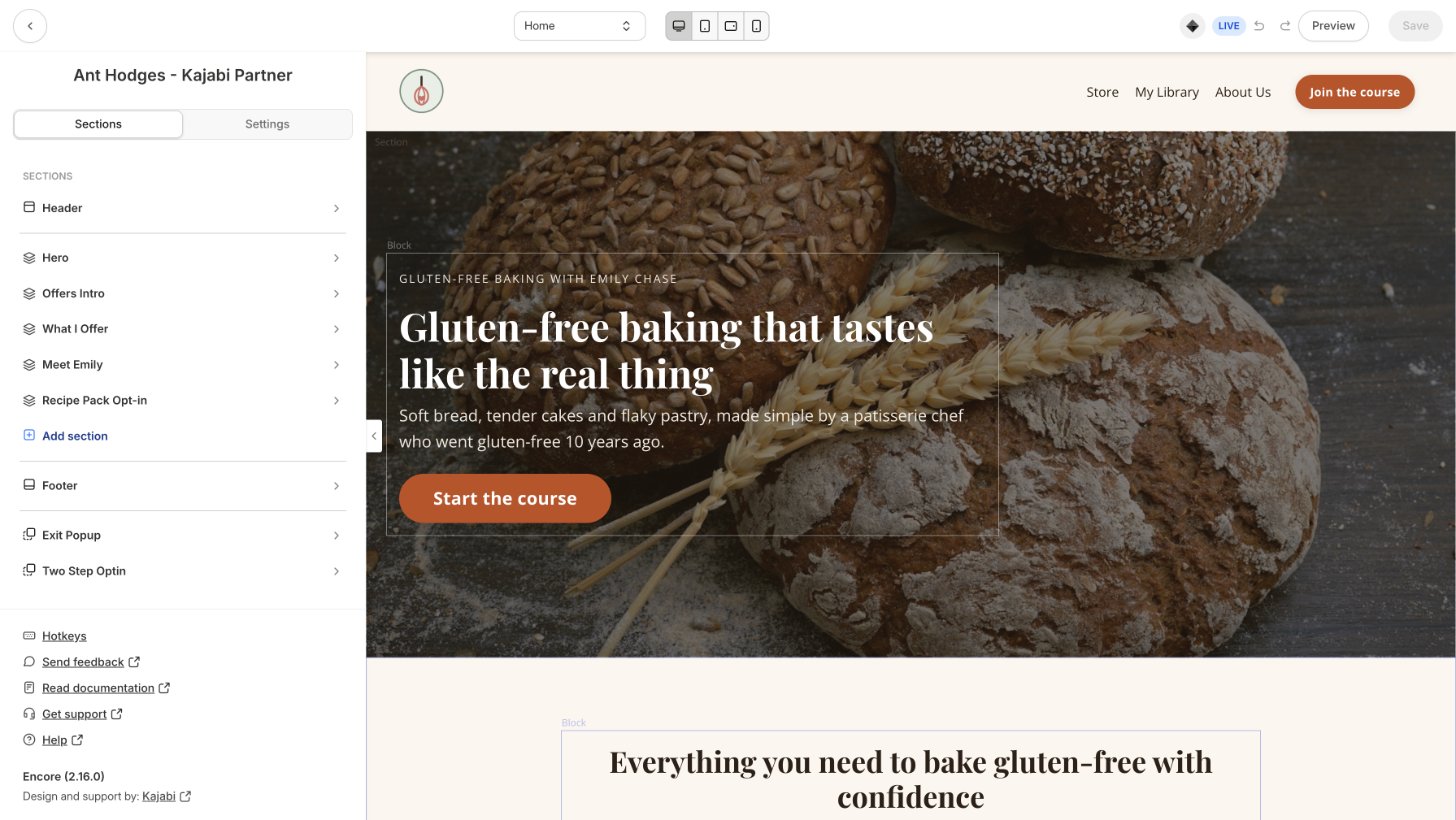
Kajabi lists eight current templates, from the bold black and white Kim to the calm Serenity and the coach-friendly Reach.7 Each one uses the same tools, so pick the one closest to your style and change the rest. Switching templates later replaces the built-in pages, so choose with care.7
My tip: build your homepage with five sections or fewer. A hero, what you offer, who you are, one opt-in and one call to action is all most experts need.
What is Nova, and how does AI build pages?
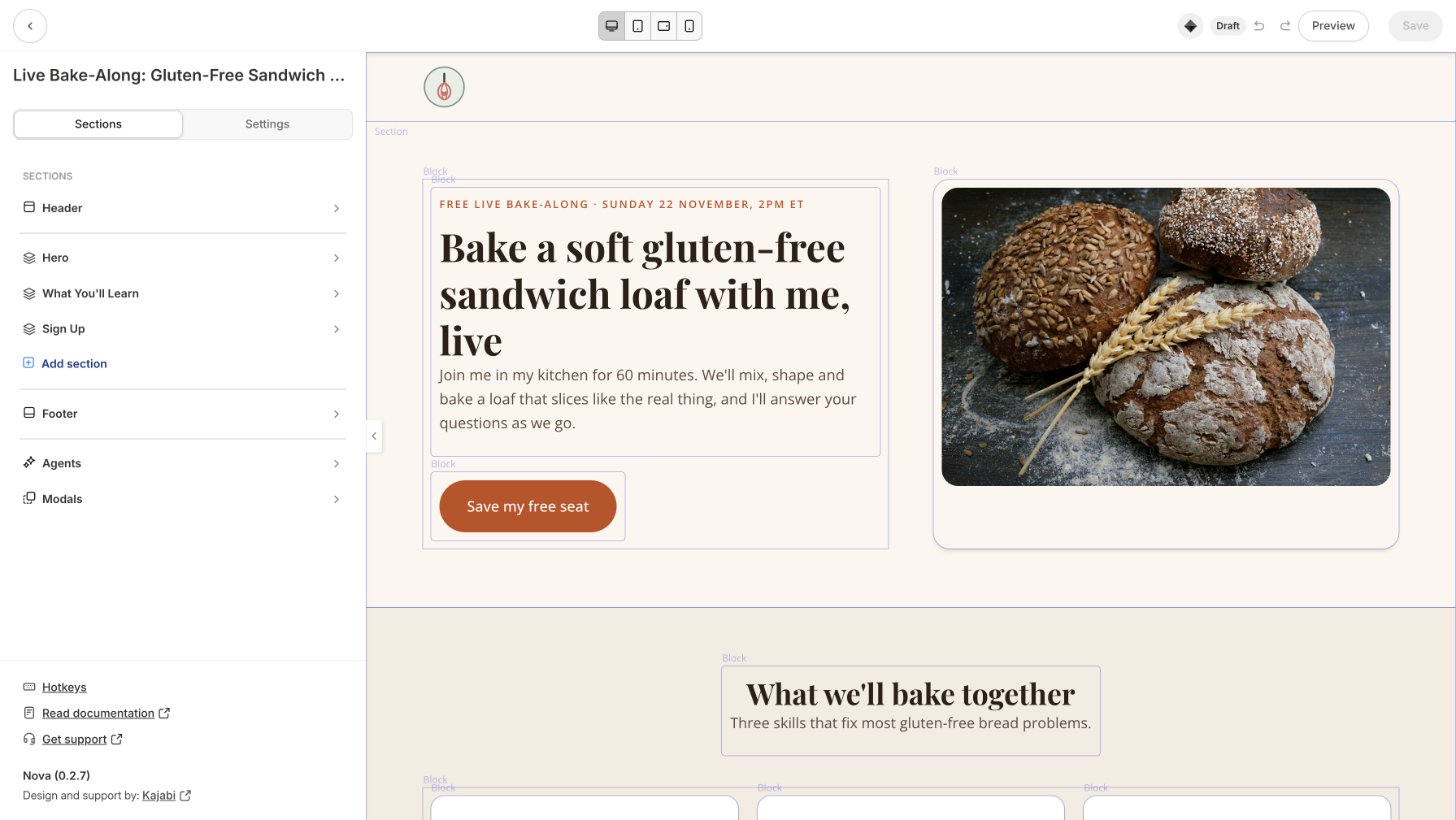
Nova is Kajabi's newest page template, made for building pages with AI. You connect the Kajabi MCP to an AI tool like Claude, describe the page you want, and the page fills in as the AI works.6 You can ask for changes in plain words, or share a screenshot of a layout you like and have something similar built. Kajabi's Nova overview explains it.
Nova is in beta, rolling out in phases, and it works on landing pages for now. More page types are planned, and your existing Encore pages keep working as they are.6
This is the part of Kajabi that has changed my week the most. For Emily, I asked for a registration page for her live bake-along, and the Kajabi MCP built it in Nova from my brief.
Can you use your own domain, a blog and SEO?
The answer is yes to all three. Every plan includes a custom domain, and Kajabi's custom domain guide walks you through connecting it with nameservers or a simple record. SSL security is included, and changes can take up to 72 hours to settle.8
The blog lives on your website too, with tags, scheduled posts and SEO settings for every post.9 Each page and post can have its own SEO title, description and sharing image, as Kajabi's SEO guide explains.10
There's one more feature I'm excited about. From 9th November 2026, Kajabi's AI Discoverability setting is on by default. It creates an llms.txt file that maps your public pages, prices and recent blog posts for AI assistants like ChatGPT and Claude, while keeping member content private.11 Kajabi's AI Discoverability guide covers the details.
Which Kajabi plan do you need for your website?
Every plan includes a website, unlimited landing pages and a custom domain. The plans differ in how many websites you can run, whether the Kajabi badge shows in your footer, and whether you can edit the code behind your site. You can compare them on the Kajabi pricing page.12
Basic
$179/mo
or $143/mo billed yearly
- 1 website
- Unlimited landing pages
- Custom domain
- Remove Kajabi branding
- Edit your site's code
Growth
$249/mo
or $199/mo billed yearly
- 1 website
- Unlimited landing pages
- Custom domain
- Remove Kajabi branding
- Edit your site's code
Pro
$499/mo
or $399/mo billed yearly
- 3 websites
- Unlimited landing pages
- Custom domain
- Remove Kajabi branding
- Edit your site's code
Prices in US$, checked on 8th November 2026.
Kajabi takes no share of your sales on any plan, and every plan comes with a 30-day money-back guarantee.12 Start on Basic for one site, move to Growth to remove the Kajabi badge and add team members, and choose Pro when you need more than one site.
The standard free trial lasts 14 days, as Kajabi's trial information page explains.13 Through my partner link you get 30 days, which is plenty of time to build your homepage and your first landing page.
Build your website free for 30 days.That's double the standard trial, through my partner link.
Start your 30-day trial →How do you keep your website simple?
The websites that sell best for my clients have very few pages. A clear homepage, one way to join your list and one page for your main offer will outperform a site with twenty menu links. That's the thinking behind the framework I teach in Simplify the Funnel®, the Minimum Viable Funnel.
Definition
Minimum Viable Funnel™
The Minimum Viable Funnel is a term coined by Ant Hodges, author of Simplify the Funnel®. It describes the simplest funnel that can sell: one traffic source, one no-brainer offer, one conversion event and one core offer.
Your website is where that funnel starts. Emily's homepage points every visitor to two places: the free recipe pack and her course. Here's how I'd shape your first Kajabi site:
- Keep your main menu to four links or fewer.
- Give every page one job and one main button.
- Put your free offer on the homepage, above the footer.
- Build a landing page for each offer, and link to it from your homepage.
“It’s time to reject complexity as strategy. Embrace the power of doing less, but better.”
From Simplify the Funnel® by Ant Hodges
Where does AI help with your Kajabi website?
My belief is that AI creates movement, and humans create momentum. Let AI do the building work in the back office, while your words, stories and offers stay fully human. There’s more on this in my post Built to Be Human.
Back office: let AI help
Front office: stay human
- Your story and your photos
- Your offer and your price
- Your final check before a page goes live
Cofounder saves pages as drafts and never publishes them for you, which is exactly how it should be.14 Kajabi's Cofounder overview explains what it can do. My 19-part sales pages now start with my own copy and framework, and the MCP does the layout work that used to take me days.
Who is the Kajabi website builder best for?
The Kajabi website builder fits best when your website sells your own knowledge. That covers coaches, course creators, authors and experts who want their site, products, emails and payments in one place.
A great fit if you
- Sell courses, coaching, memberships or a community
- Want your site and your products in one account
- Would rather build pages than manage plugins
Another route may suit you if you
- Run a large shop selling physical products
- Need a site with hundreds of custom-coded pages
If most of your sales are physical products, a dedicated online shop may suit you better. And if you need full control of your code, that's on the Pro plan.12
Try this
Your first 30 days with the Kajabi website builder
- Start your trial and set your logo, fonts and colours.
- Choose a template from the Template Store and build your homepage.
- Add one free offer with a form on the homepage.
- Build a landing page for your main offer, in Encore or Nova.
- Connect your domain and fill in the SEO settings for each page.
Kajabi website builder FAQs
Can I build my whole website on Kajabi?
Yes, Kajabi includes a homepage, about, contact, blog, store and library pages, plus unlimited landing pages. Every plan includes a custom domain.212
Can Kajabi replace WordPress, Squarespace or Wix?
For most coaches and experts, yes. Kajabi lists Squarespace, Shopify and Wix as tools it replaces, and your pages connect to your products, emails and checkout with no plugins.1
What's the difference between Encore and Nova?
Encore is the website builder with the most settings, used for website pages. Nova is the newest template, built for creating landing pages with AI, and it is currently in beta.36
Can I remove the Powered by Kajabi badge?
Yes, the Growth and Pro plans remove Kajabi branding from your site. The Basic plan shows a small Powered by Kajabi line in the footer.12
Can I try the Kajabi website builder for free?
Yes, every new account starts with a free trial. The standard trial is 14 days, and signing up through my partner link gives you 30 days.13
More Kajabi guides
See the full Kajabi review for every feature, plan and price in one place, or read the Kajabi Email Marketing guide next. New feature guides are added each week.
About Ant Hodges
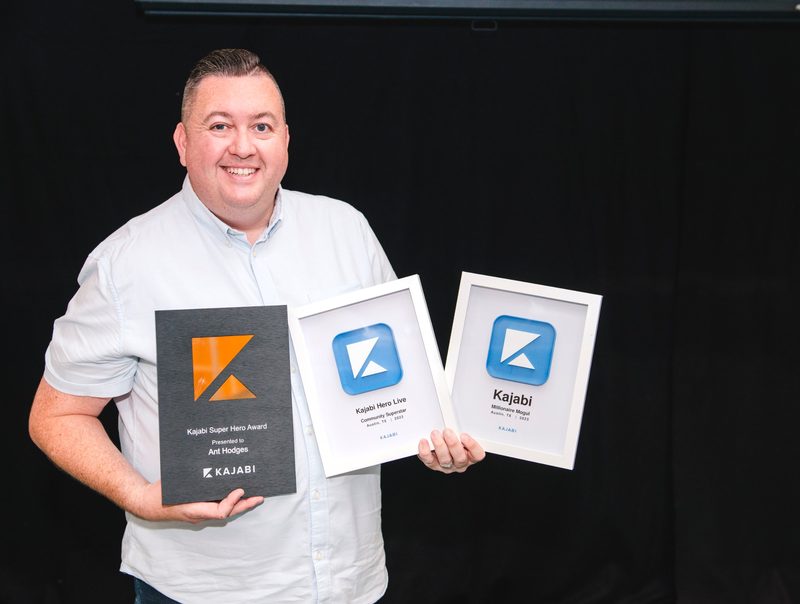
Ant Hodges is the author of Simplify the Funnel®, a Kajabi Founder and Partner since 2012, and a winner of the Kajabi Millionaire Hero Award. He moved from WordPress to Kajabi in 2016, now runs all of his sites on Kajabi, and helps online business owners, coaches, creators and experts simplify their businesses.
Sources
- Kajabi (2026) "Website builder." kajabi.com/features/pages ↩
- Kajabi Help Center (2026) "Build a website with Kajabi." help.kajabi.com ↩
- Kajabi Help Center (2026) "Page Editors overview." help.kajabi.com ↩
- Kajabi Help Center (2026) "Add and manage page sections." help.kajabi.com ↩
- Kajabi Help Center (2026) "Add and manage blocks on pages." help.kajabi.com ↩
- Kajabi Help Center (2026) "Nova theme overview." help.kajabi.com ↩
- Kajabi Help Center (2026) "Website templates overview." help.kajabi.com ↩
- Kajabi Help Center (2026) "Connect a custom domain." help.kajabi.com ↩
- Kajabi Help Center (2026) "Blog overview." help.kajabi.com ↩
- Kajabi Help Center (2026) "SEO and social sharing." help.kajabi.com ↩
- Kajabi Help Center (2026) "Manage AI Discoverability for a site." help.kajabi.com ↩
- Kajabi (2026) "Pricing." kajabi.com/pricing ↩
- Kajabi Help Center (2026) "Kajabi trial information." help.kajabi.com ↩
- Kajabi Help Center (2026) "Cofounder overview." help.kajabi.com ↩
All sources checked and live on 8th November 2026.

Every Kajabi feature, explained simply
- Kajabi review: start here
- Kajabi Courses
- Kajabi Communities
- Kajabi Email Marketing
- Kajabi Payments
- New guides added each week
Watch me work in Kajabi
Short walkthroughs from my YouTube channel. Press play to watch here, or open any video on YouTube.

Kajabi MCP + Claude: Building a Landing Page in Kajabi Using AI
Watch on YouTube
Build a High Converting Sales Page in Minutes (on Kajabi)
Watch on YouTube
When Using Kajabi Should You Have a Different Website Too?
Watch on YouTube
How to Add Custom Fonts in Kajabi Websites and Landing Pages
Watch on YouTubeFree email updates
Simplify your business, one email at a time.
Join my email list for simple, practical ideas on Kajabi, marketing and running a business that fits your life.
- New Kajabi guides and tips as soon as they go live
- Fresh blog posts and Less Is The Strategy podcast episodes
- First news of my community, training and events