Home › Kajabi Review › Kajabi Payments
Kajabi Payments review · Updated November 2026Kajabi Payments Review: Keep More of Every Sale
Fees, payouts, Stripe, pay later options and the 2026 updates, from a Kajabi user who moved all of his payments into Kajabi Payments when it launched in 2023.
Start your 30-day Kajabi trial →- Kajabi user since 2012
- 3 Kajabi awards
- 30 days free, double the standard trial
 By Ant HodgesKajabi user since 2012 · Updated 8th November 2026 · 14 minute read
Money is the part of an online business that people worry about most, and it's the part that should feel the simplest. Your customer pays, the money arrives in your bank, and you get on with your day. That's exactly what Kajabi Payments is built to do.
When Kajabi Payments launched in 2023, I moved all of my payments into it.14 Before that, my checkout sat in Kajabi while the money itself lived in a separate processor with its own login. Now every sale, refund, subscription and payout sits in the same account as my courses, my community and my emails. One dashboard tells me what came in, what went out and when it lands in my bank. That move made my business noticeably simpler, and simpler is always my goal.
This guide explains how Kajabi Payments works, what it really costs, how it compares with plugging Stripe in directly, and what changed in 2026. The headline is worth saying up front. Kajabi doesn't take a share of your revenue. You pay a small processing fee on each transaction, and on most plans that fee is lower than you'd pay elsewhere.
The short answer
Kajabi Payments is the payment processor built into Kajabi, and it runs on Stripe behind the scenes. Kajabi takes no revenue share on any plan, so the only charge is a card processing fee, from 2.9% + 30¢ on Basic down to 2.7% + 30¢ on Pro for US businesses. Connecting your own Stripe account instead adds an extra Kajabi fee of up to 2%, so Kajabi Payments is the cheaper route on every plan. Plans start at $179 a month, the standard trial is 14 days, and through my partner link you get 30 days.
On this page
- What is Kajabi Payments?
- Does Kajabi take a cut of your sales?
- How much does Kajabi Payments cost?
- Is Kajabi Payments cheaper than Stripe?
- What can you do with Kajabi Payments?
- What's new in Kajabi Payments in 2026?
- How do you set up Kajabi Payments?
- Which Kajabi plan gives the best rate?
- How do you keep your payments simple?
- Kajabi Payments FAQs
What is Kajabi Payments?
Kajabi Payments is Kajabi's own payment processor, built in partnership with Stripe. Stripe does the heavy lifting in the background, and you never need a Stripe account of your own to use it.3 Stripe describes Kajabi Payments as a payment processing solution built directly into Kajabi and powered by Stripe.7
Everything you'd normally manage in a separate processor now lives in your Kajabi dashboard. That covers transactions, refunds, subscriptions, invoices, sales tax and payouts, all in one place.3 It's available to businesses registered in the United States, Canada, Australia, the United Arab Emirates, the United Kingdom and selected European countries.3
Your customers can pay the way they like to pay. Kajabi Payments accepts all major credit and debit cards, Apple Pay, Google Pay and Link, plus the buy now, pay later options Afterpay and Klarna.13
Cards
Every major credit and debit card, with nothing extra to set up.3
Digital wallets
Apple Pay, Google Pay and Link, so buyers can pay in a tap.3
Pay later
Afterpay (Clearpay in the UK) and Klarna, with you paid in full straight away.11
Does Kajabi take a cut of your sales?
No, and this is the part I most want you to understand. Kajabi takes no revenue share as a platform, so you keep whatever you earn.2 That's true on Basic, Growth and Pro alike.
What you do pay is a processing fee on each successful transaction. Every card payment online costs something to process, wherever you sell, because the card networks and banks charge for moving the money. Kajabi Payments simply passes that cost on as one clear fee per sale.5
Think of it this way: a revenue share grows as your business grows. A processing fee is a fixed, small percentage that you'd pay with any processor, and on Kajabi it gets smaller as you move up a plan.
How much does Kajabi Payments cost?
The card rate depends on your plan. For US businesses it's 2.9% + 30¢ on Basic, 2.8% + 30¢ on Growth and 2.7% + 30¢ on Pro.2 Apple Pay, Google Pay and Link are charged at the same card rate.4 Here's the full US fee list, from Kajabi's US fees page.
| What you're charged for | US fee |
|---|---|
| Card payments, Apple Pay, Google Pay and Link | 2.9% + 30¢ on Basic, 2.8% + 30¢ on Growth, 2.7% + 30¢ on Pro |
| Cards issued in another country | Plus 1.5% |
| Currency conversion | Plus 1%, only when the offer currency differs from your bank's |
| Subscriptions and payment plans | Plus 0.7% on each payment in the series |
| Afterpay | 6% + 30¢ per one-time payment |
| Klarna | 5.99% + 30¢ per one-time payment |
| Instant Payouts (optional) | 1.5%, with a 50¢ minimum |
| Invoices | Plus 0.4% per invoice |
| Kajabi Sales Tax | 15¢ per transaction, only where you turn it on |
| Disputes (chargebacks) | $15 per disputed payment |
| Refunds | No fee, though the original fee isn't returned |
Fees in US$ for US businesses, checked on 8th November 2026.24 Rates differ by country, and Kajabi lists each region on its own page.
Most experts only ever see the first line. A one-off card sale on Basic costs 2.9% + 30¢, and everything else in the table only applies when you choose that feature.
Is Kajabi Payments cheaper than Stripe?
Yes, once you count everything you'd pay. Kajabi Payments is built on Stripe, so you get the same proven technology underneath, at a better price on Kajabi.3
Stripe's standard US price for online card payments is 2.9% + 30¢.6 You can still connect your own Stripe account to Kajabi, and plenty of people did before Kajabi Payments existed. When you do, Kajabi adds a third-party processor fee on top of Stripe's own fee: 2% on Basic, 1% on Growth and 0.5% on Pro.25 That extra fee doesn't apply to PayPal, or in countries where Kajabi Payments isn't offered.2
Here's what that means on a $197 course sale with a US card.
| Plan | Kajabi Payments | Your own Stripe account | You keep extra |
|---|---|---|---|
| Basic | $6.01 (2.9% + 30¢) | $9.95 (2.9% + 30¢, plus 2%) | $3.94 |
| Growth | $5.82 (2.8% + 30¢) | $7.98 (2.9% + 30¢, plus 1%) | $2.16 |
| Pro | $5.62 (2.7% + 30¢) | $7.00 (2.9% + 30¢, plus 0.5%) | $1.38 |
Worked from Kajabi's published rates and Stripe's standard US rate, checked on 8th November 2026.26
Those few dollars add up quickly. Sell 100 courses at $197 on the Basic plan and the difference is $394 that stays in your pocket. On Growth and Pro the card rate itself also sits below Stripe's standard 2.9%, which Kajabi describes as typically lower than standard Stripe pricing.3
Several features also only work through Kajabi Payments. Apple Pay, Google Pay, Link, Afterpay, Klarna, automatic sales tax, invoicing and the QuickBooks and Xero connections all need it switched on.3
What can you do with Kajabi Payments?
Kajabi Payments covers every way an expert gets paid. Here are the tools you'll actually use, in plain English.
Subscriptions
Monthly or yearly memberships, with billing dates you can change later.3
Payment plans
Split a bigger price into a set number of payments.3
Invoices
Bill clients for coaching, deposits or custom work, right from your dashboard.3
Sales tax
Tax worked out automatically at checkout, once you've set it up.3
Bookkeeping sync
Sales flow straight into QuickBooks Online or Xero.3
Failed payment retries
Missed payments are retried for you on a set schedule.3
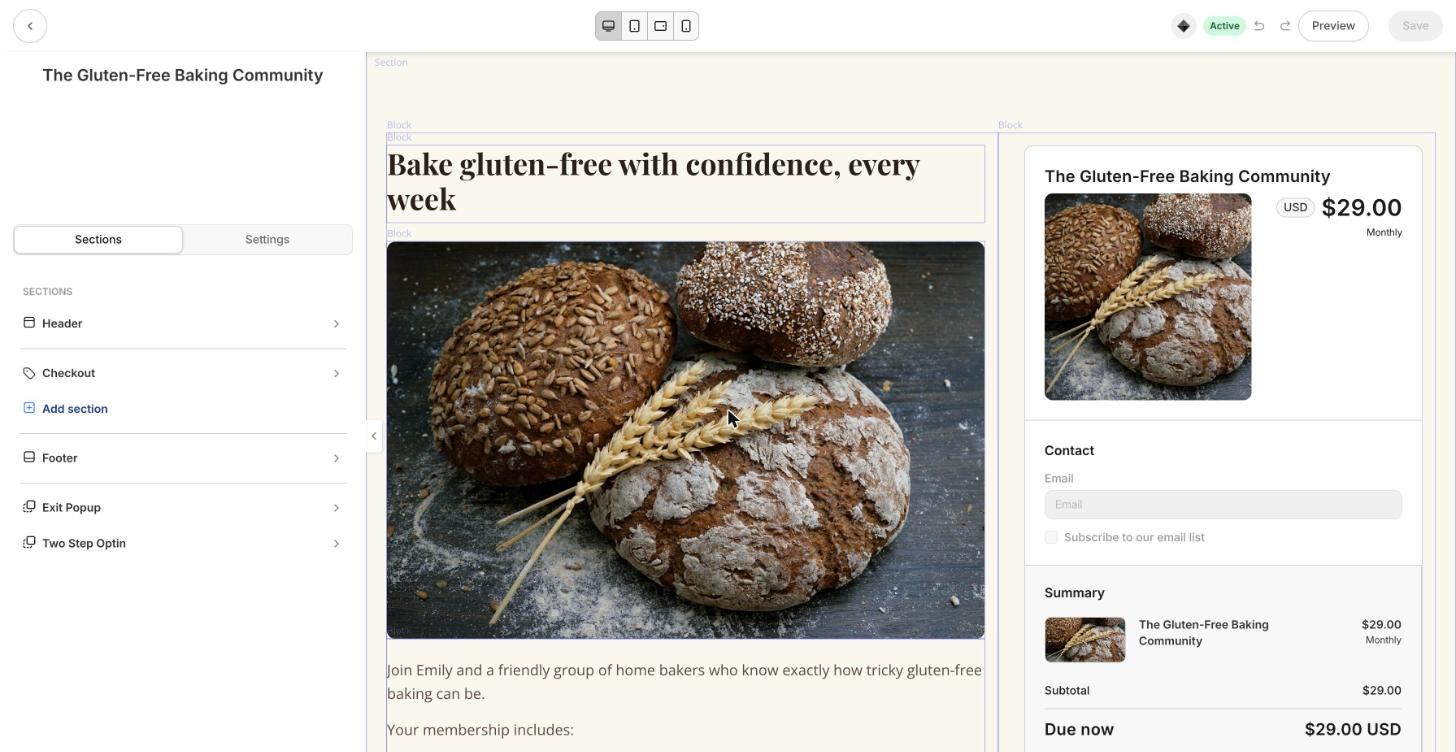
Checkout is where all of this comes together. Here's the checkout I built for Emily Chase, the patisserie chef I created for my examples, for her monthly Gluten-Free Baking Community. It's built in Kajabi's newest checkout builder, the same page builder you use for the rest of your site.
Getting paid is just as simple. Payouts can go to your bank daily, weekly or monthly, and new accounts start on a monthly schedule while Kajabi gets to know your business.10 When you need money sooner, Instant Payouts can send your available balance in minutes, even at weekends.3
With Afterpay and Klarna, your customer spreads the cost while you're paid in full straight away.11 That's a lovely way to make a bigger program affordable without you carrying the risk of a payment plan.
What's new in Kajabi Payments in 2026?
Kajabi has added a run of useful payment updates this year. These are the ones I'd point out, taken from Kajabi's product changelog.12
- Link by Stripe (October 2026)Returning buyers can pay without typing their card details again. You turn it on for each offer, cart or invoice.12
- Cancellation discounts (October 2026)When a subscriber goes to cancel, you can show them a discount to stay. This works on Kajabi Payments subscriptions.12
- Customer self-pause (October 2026)Members can pause their own subscription from their billing page, which keeps them with you instead of cancelling.12
- Pay off payment plans early (August 2026)Collect the rest of a plan in one charge, with an optional discount for paying early.12
- Pause until a set date (August 2026)Pause a subscription or payment plan and choose exactly when it starts again.12
- Monthly balance report (August 2026)A downloadable report of your charges, refunds, fees and payouts each month, which your bookkeeper will love.12
Notice how many of these help you keep members rather than find new ones. Cancellation discounts and self-pause are simple retention tools that used to need extra software.
How do you set up Kajabi Payments?
Setting up takes one sitting, and Kajabi's US setup guide walks you through it.8 Have your business details, a government ID and your bank details ready before you start.
- Open payment setupGo to Settings, then Payment settings, then Payment setup, and click Get Started.8
- Choose your country and business typePick where your business is registered, then choose Individual or Company and your business structure.8
- Add your business detailsAccept the terms, then enter your address, phone number and website on a secure page hosted by Stripe.8
- Verify your identity and add your bankUpload a government ID, then add the bank account your payouts should go to.8
- Switch your offers acrossIf you used Stripe before, go to Sales, then Pricing, and use the banner to convert your offers in one go.9
One thing to know if you're moving from Stripe. Existing subscriptions and payment plans keep billing through Stripe until you migrate them, and only new purchases go through Kajabi Payments.9 Customers with cards saved in Stripe may need to enter their card once more on their next purchase.3
My tip: switch every offer on the same day, then add Apple Pay and Google Pay straight away. You want every new buyer on the cheaper rate and the faster checkout from day one.
Which Kajabi plan gives the best rate?
Every plan includes Kajabi Payments, and the rate improves as you move up. Growth gets a discounted rate and Pro gets the deepest discount, as the Kajabi pricing page shows.2
Basic
$179/mo
or $143/mo billed yearly
- 2.9% + 30¢ card rate
- No revenue share
- 2% fee if you use your own Stripe
Growth
$249/mo
or $199/mo billed yearly
- 2.8% + 30¢ card rate
- No revenue share
- 1% fee if you use your own Stripe
Pro
$499/mo
or $399/mo billed yearly
- 2.7% + 30¢ card rate
- No revenue share
- 0.5% fee if you use your own Stripe
Prices and US card rates in US$, checked on 8th November 2026.
Choose your plan for the features you need, and let the card rate be a bonus. Every plan has a 30-day money-back guarantee.2 The standard free trial lasts 14 days, as Kajabi's trial information page explains.13 Through my partner link you get 30 days, which is plenty of time to set up Kajabi Payments and take your first sale.
Try Kajabi free for 30 days.That's double the standard trial, through my partner link.
Start your 30-day trial →How do you keep your payments simple?
Every extra tool in a business brings another login, another bill and another place for money to go missing. My name for that cost is the Complexity Tax, and it's one of the ideas at the heart of Simplify the Funnel®.
Definition
The Complexity Tax
The Complexity Tax is a term coined by Ant Hodges, author of Simplify the Funnel®. It describes the hidden cost that every extra tool, step and moving part adds to a business, paid in time, money and focus.
Payments are where that tax hurts most, because it's paid in actual dollars. Moving my payments into Kajabi took a whole tool out of my week. Here's the simple flow I'd aim for:
- Run every offer through Kajabi Payments, so there's one place to look.
- Offer one price and, at most, one payment plan per offer.
- Turn on Apple Pay and Google Pay for a faster checkout.
- Connect QuickBooks or Xero once, and let your sales flow across.
“It’s time to reject complexity as strategy. Embrace the power of doing less, but better.”
From Simplify the Funnel® by Ant Hodges
Where does AI help with your payments?
My belief is that AI creates movement, and humans create momentum. Let AI handle the set-up work in the back office, while your prices and your promise to customers stay fully human. There’s more on this in my post Built to Be Human.
Back office: let AI help
Front office: stay human
- Setting your prices and your offer
- Publishing an offer and taking real money
- Talking to a customer about a refund
When I build examples with the Kajabi MCP, the offers it creates are saved as drafts. Publishing still happens in Kajabi itself, which keeps a human in charge of anything that takes real money. That's exactly how it should be.
Who is Kajabi Payments best for?
Kajabi Payments fits almost every expert selling on Kajabi in a supported country. If you sell courses, coaching, memberships or a community, it's the simplest and cheapest way to get paid on the platform.
A great fit if you
- Sell from a business in the US, Canada, UK, Australia, UAE or selected European countries
- Want one dashboard for sales, payouts and refunds
- Want Apple Pay, Google Pay, Klarna or Afterpay at checkout
Another route may suit you if you
- Run your business from a country Kajabi Payments doesn't cover yet
- Have a business type on Stripe's restricted list
Where Kajabi Payments isn't available yet, you can still connect Stripe or PayPal, and Kajabi adds no extra processor fee in those countries.2 Kajabi says it's working to bring Kajabi Payments to more regions.3
Try this
Your first 30 days with Kajabi Payments
- Start your trial and set up Kajabi Payments with your business and bank details.
- Create one offer with one clear price for your main product.
- Turn on Apple Pay and Google Pay, and add Klarna or Afterpay if your price suits it.
- Build your checkout in the checkout builder to match your brand.
- Take your first sale and watch it appear on your payouts page.
Kajabi Payments FAQs
Does Kajabi take a percentage of my sales?
No, Kajabi takes no revenue share on any plan. You only pay a processing fee on each transaction, from 2.9% + 30¢ on Basic for US businesses.2
Is Kajabi Payments the same as Stripe?
Kajabi Payments is built in partnership with Stripe and powered by Stripe behind the scenes, but you manage it all inside Kajabi with no Stripe account needed.3
Is Kajabi Payments cheaper than connecting Stripe?
Yes, it works out cheaper on every plan. Connecting your own Stripe account adds a Kajabi fee of 2% on Basic, 1% on Growth or 0.5% on Pro on top of Stripe's fee, while Kajabi Payments has no extra fee.2
How quickly do Kajabi Payments payouts arrive?
Payouts can be daily, weekly or monthly, and new accounts start on a monthly schedule. Instant Payouts can send your available balance in minutes for a small fee.104
Can I still use PayPal with Kajabi?
Yes, PayPal can sit alongside Kajabi Payments on the same offer, and Kajabi's third-party processor fee doesn't apply to PayPal.32
More Kajabi guides
See the full Kajabi review for every feature, plan and price in one place, or read the Kajabi Courses guide to build something worth selling. New feature guides are added each week.

About Ant Hodges
Ant Hodges is the author of Simplify the Funnel®, a Kajabi Founder and Partner since 2012, and a winner of the Kajabi Millionaire Hero Award. He moved all of his payments into Kajabi Payments when it launched in 2023, and helps online business owners, coaches, creators and experts simplify their businesses.
Sources
- Kajabi (2026) "Kajabi Payments." kajabi.com/features/payments ↩
- Kajabi (2026) "Pricing." kajabi.com/pricing ↩
- Kajabi Help Center (2026) "Kajabi Payments overview." help.kajabi.com ↩
- Kajabi Help Center (2026) "Kajabi Payments fees: United States." help.kajabi.com ↩
- Kajabi Help Center (2026) "Kajabi Payments processing fees." help.kajabi.com ↩
- Stripe (2026) "Pricing." stripe.com/pricing ↩
- Stripe (2026) "Kajabi unveils Kajabi Payments, powered by Stripe." stripe.com/customers/kajabi ↩
- Kajabi Help Center (2026) "Set up Kajabi Payments: United States." help.kajabi.com ↩
- Kajabi Help Center (2026) "Convert offers from Stripe to Kajabi Payments." help.kajabi.com ↩
- Kajabi Help Center (2026) "Kajabi Payments payouts." help.kajabi.com ↩
- Kajabi Help Center (2026) "Buy Now, Pay Later methods with Kajabi Payments." help.kajabi.com ↩
- Kajabi (2026) "Changelog." feedback.kajabi.com/changelog ↩
- Kajabi Help Center (2026) "Kajabi trial information." help.kajabi.com ↩
- PR Newswire (2023) "Kajabi unveils three significant products to its leading creator platform." prnewswire.com ↩
All sources checked and live on 8th November 2026.

Every Kajabi feature, explained simply
- Kajabi review: start here
- Kajabi Courses
- Kajabi Communities
- Kajabi Email Marketing
- Kajabi Website Builder
- New guides added each week
Watch me work in Kajabi
Short walkthroughs from my YouTube channel. Press play to watch here, or open any video on YouTube.

Kajabi Price Increase Made Me Investigate (What I Found Shocked Me)
Watch on YouTube
Kajabi Just Got Expensive (Here's Why That's Actually a Good Thing)
Watch on YouTube
Build a High Converting Sales Page in Minutes (on Kajabi)
Watch on YouTube
7 Essential Tips for Maximizing Your Kajabi Account
Watch on YouTubeFree email updates
Simplify your business, one email at a time.
Join my email list for simple, practical ideas on Kajabi, marketing and running a business that fits your life.
- New Kajabi guides and tips as soon as they go live
- Fresh blog posts and Less Is The Strategy podcast episodes
- First news of my community, training and events